

Help Center/ CodeArts Build/ FAQs/ npm Builds/ Why Am I Seeing the Error Message "error: Could Not Write Config File"?
Updated on 2025-10-15 GMT+08:00
Why Am I Seeing the Error Message "error: Could Not Write Config File"?
Symptoms
When an npm build task is executed, the following error information is reported in the log: error: could not write config file /npmcache/_cacache/tmp/git-clone-b0ba91a1/.git/config: Disk quota exceeded
Cause Analysis
The npm cache space is insufficient and needs to be cleared.
Solution
- Go to the CodeArts Build homepage.
- Select the build task, click
 , and click Edit.
 - On the Build Actions page, modify the Build with npm action.
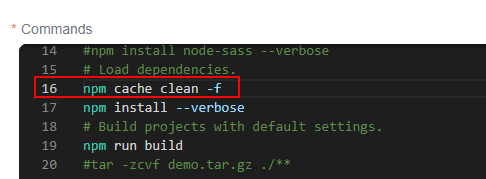
- Add the npm cache clean -f command before the npm install command, save the task, and execute the task again.
Parent topic: npm Builds
What is your overall rating for this page?
0
1
2
3
4
5
6
7
8
9
10
Very dissatisfiedVery satisfied
Thank you very much for your feedback. We will continue working to improve the documentation.See the reply and handling status in My Cloud VOC.
The system is busy. Please try again later.
For any further questions, feel free to contact us through the chatbot.
Chatbot


