

Updated on 2026-10-23 GMT+08:00
How Do I Adjust the Model's Thinking Effort?
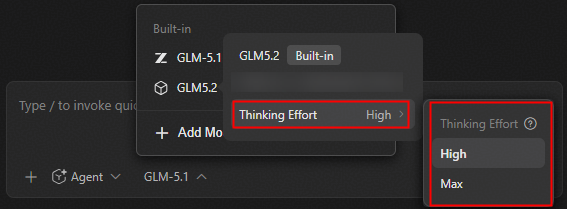
Hover over a model, and then adjust its thinking effort under Thinking Effort as needed. This setting takes effect only for models that support thinking effort adjustment. If the target model does not support it, the thinking effort option is not displayed.
Figure 1 Adjusting the model's thinking effort
What is your overall rating for this page?
0
1
2
3
4
5
6
7
8
9
10
Very dissatisfiedVery satisfied
Thank you very much for your feedback. We will continue working to improve the documentation.See the reply and handling status in My Cloud VOC.
The system is busy. Please try again later.
For any further questions, feel free to contact us through the chatbot.
Chatbot


