

Analysis and Source Tracing
After an incident, you may need to analyze major attacks or defensive outcomes to identify underlying security issues, such as capacity risks, gaps in emergency response procedures, or weak security awareness. To support this, you can leverage security reports.
The security analysis feature enables querying and statistical aggregation of raw log data, and also supports traceback analysis based on that data.
Analysis and Source Tracing
- Log in to the SecMaster console.
- Go to the target workspace.
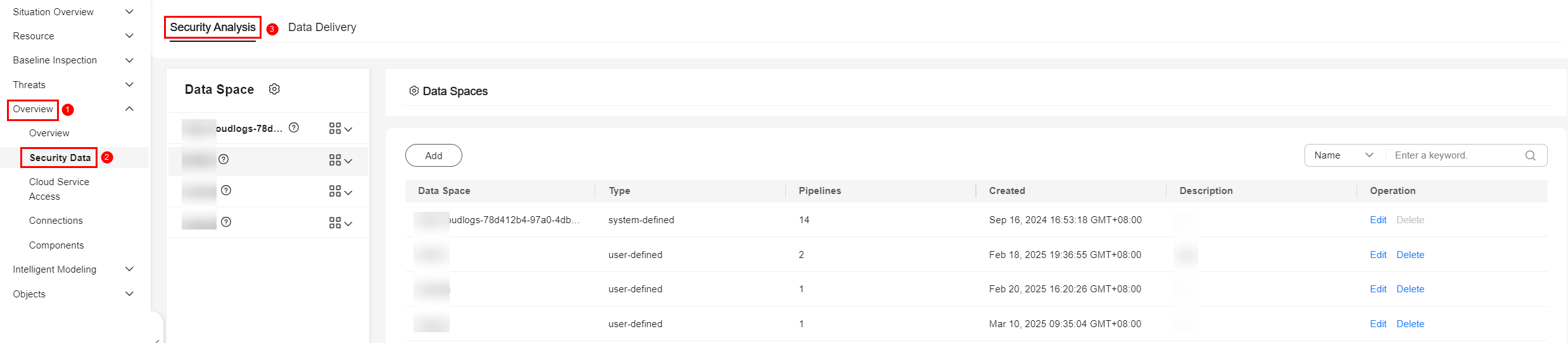
- In the navigation pane on the left, choose . Figure 1 Accessing the Security Analysis tab
- In the data space navigation tree on the left, click a data space name to show the pipeline list. Click a pipeline name. On the displayed page, you can search the pipeline data. Figure 2 Pipeline data page

- On the pipeline data retrieval page, select the query and analysis time range, set search criteria, or directly enter a query statement to perform source tracing analysis.
For details about search criteria or search statement, see Query Syntax.
After the query, you can view the details about raw logs. Figure 3 shows an example.
You can filter the data to show only the fields you need for analysis. Figure 4 shows an example.


Common Query Statements
| Requirement | Pipeline | Query Statement |
|---|---|---|
| Querying the access of an IP address | sec-waf-access | x_forwarded_for='x.x.x.x' or remote_ip='x.x.x.x' and response_code='200' | select x_forwarded_for,remote_ip,http_host,url,response_code |
| Querying access URL containing certain keywords | sec-waf-access | url like '*actuator*' and response_code='200' | select *,count(x_forwarded_for) as num group by x_forwarded_for,remote_ip,http_host,url |
| Querying the access of a domain name to iptop | sec-waf-attack | http_host=MATCH_QUERY('www.xx.com') | select *,count(remote_ip) as num group by http_host,remote_ip |
| Querying the attacks from an IP address | sec-waf-attack | sip='x.x.x.x' and not attack='custom_whiteblackip' and not attack='custom_custom' | select attack,sip,http_host,uri,hit_data,status |
| Querying attacks against a certain domain name | sec-waf-attack | http_host='www.aa.com' and not attack='custom_whiteblackip' and not attack='custom_custom' and not attack='robot' | select attack,sip,http_host,uri,hit_data,status |
| Querying commands executed on a host | sec-hss-log | (dest_asset.name='aa' or ipList='x.x.x.x') and alarmKey='proc_report_2' | select dest_asset.name,ipList,appendInfo.cmdline,appendInfo.path |
| Querying logins for a host | sec-hss-log | alarmKey like 'login_check_*' and ipList='x.x.x.x' | select ipList,appendInfo.service_type,appendInfo.service_port,appendInfo.login_ip ,hostIp |
| Querying alerts for a host | sec-hss-alarm | (dest_asset.name='hostname' or ipList='x.x.x.x' ) | select dest_asset.name,ipList,appendInfo.event_name,appendInfo.file_info,appendInfo.process_info |
| Querying logins for a host | sec-hss-alarm | appendInfo.event_type=4007 and (ipList='x.x.x.x' or appendInfo.forensic_info.login_ip='x.x.x.x') | select appendInfo.forensic_info.login_ip,appendInfo.forensic_info.service_type,appendInfo.forensic_info.user_name,appendInfo.event_name,ipList |
What is your overall rating for this page?
Thank you very much for your feedback. We will continue working to improve the documentation.See the reply and handling status in My Cloud VOC.
For any further questions, feel free to contact us through the chatbot.
Chatbot


