

Resizing /dev/shm
Scenario
A temporary file system (tmpfs) is mounted to /dev/shm. tmpfs is a memory-based file system implemented in Linux/Unix and has high read/write efficiency.
In CCI 2.0, the default size of /dev/shm is 64 MB, which cannot meet customer requirements. You can change its size for data exchange between processes or temporary data storage.
This section shows how to resize /dev/shm by setting a memory-backed emptyDir or configuring securityContext and mount commands.
Constraints
- /dev/shm uses a memory-based tmpfs to temporarily store data. Data is not retained after the container is restarted.
- You can use either method to change the size of /dev/shm. However, do not use both methods in one pod.
- The emptyDir uses the memory requested by the pod and does not occupy extra resources.
- Writing data to /dev/shm requires memory. In this scenario, you need to evaluate the memory usage of processes. When the sum of the memory requested by processes in the container and the data volume in the emptyDir exceeds the memory limit of the container, memory overflow occurs.
- When resizing /dev/shm, set the size to 50% of the pod's memory request.
Resizing /dev/shm Using Memory-backed emptyDir
emptyDir is mainly used for temporary data storage, disaster recovery, and runtime data sharing. It will be deleted upon deletion or migration of workload pods.
CCI 2.0 allows you to mount memory-backed emptyDir. You can specify the memory size allocated to the emptyDir and mount the emptyDir to the /dev/shm directory in the container to resize /dev/shm.
apiVersion: cci/v2
kind: Pod
metadata:
 name: pod-emptydir-name
spec:
 containers:
  - image: 'library/ubuntu:latest'
    volumeMounts:
     - name: volume-emptydir1
       mountPath: /dev/shm
    name: container-0
    resources:
     limits:
      cpu: '4'
      memory: 8Gi
     requests:
      cpu: '4'
      memory: 8Gi
 volumes:
  - emptyDir:
     medium: Memory
     sizeLimit: 4Gi
    name: volume-emptydir1
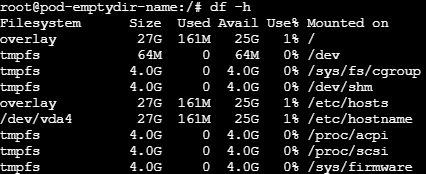
After the pod is started, run the df -h command to view the /dev/shm directory. If the following information is displayed, the size has been modified.
What is your overall rating for this page?
Thank you very much for your feedback. We will continue working to improve the documentation.See the reply and handling status in My Cloud VOC.
For any further questions, feel free to contact us through the chatbot.
Chatbot


