

Process
Flowcharts
The following flowcharts show the intelligent interaction between a user and a virtual avatar. See About the Flowcharts for details.
WebSocket APIs describes the WebSocket APIs of control for intelligent interaction.
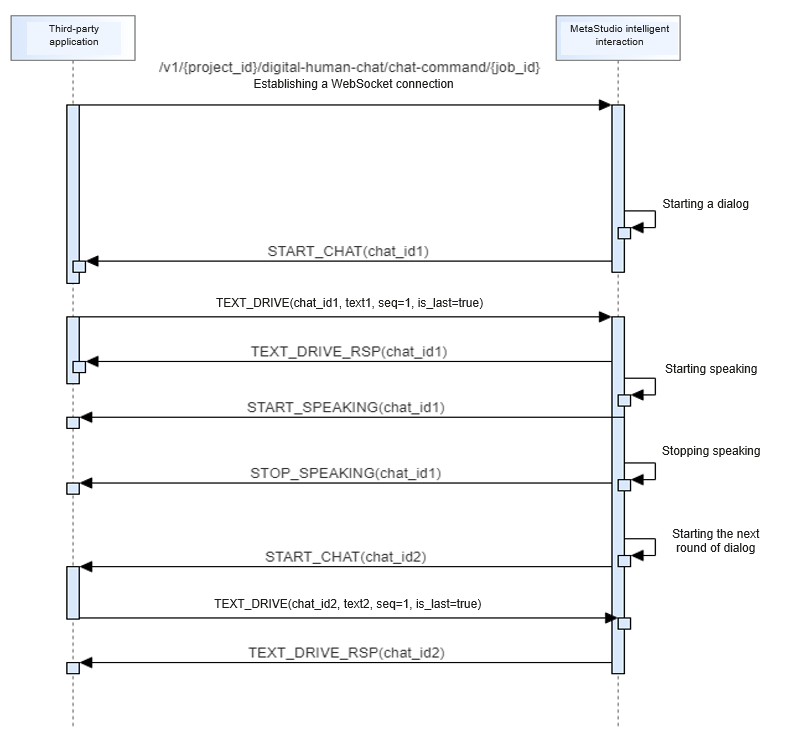
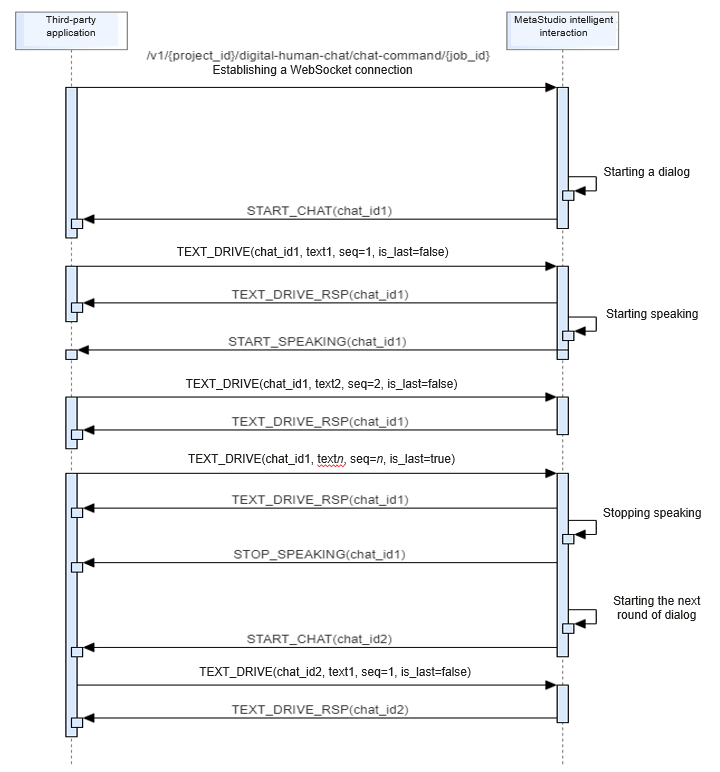


Requesting for Establishing a WebSocket Connection
When a user requests for establishing a WebSocket connection, the API WebSocket APIs will be called to create a WebSocket connection with the MetaStudio intelligent interaction service.
After the connection is established, the MetaStudio intelligent interaction service is ready and the command START_CHAT will be sent to the third-party application. After the third-party application receives START_CHAT, the user starts to send the command for text control.
Interaction process:
- The user requests for establishing a WebSocket connection for a dialog with a virtual avatar.
The following is a code example. For details about how to obtain {terminal access address}, see Obtaining an Endpoint.
wss://{terminal access address}/v1/70b76xxxxxx34253880af501cdxxxxxx/digital-human-chat/chat-command/e37a28485f684769aa537466e719629d - After receiving the request for establishing a WebSocket connection, MetaStudio returns a response.
Sending a Message for Text Control
A third-party application uses the command TEXT_DRIVE to send a message for text control to the MetaStudio intelligent interaction service.
- The field chat_id is returned in the message START_CHAT sent by MetaStudio. When a user sends a message for text control (TEXT_DRIVE), interrupting a dialog (INTERRUPT_CHAT), or stopping a dialog (STOP_CHAT), chat_id must be included in the message.
- Streaming text messages are supported. seq indicates the sequence number of the streaming text and starts from 1. is_last indicates whether the data is of the last packet of the streaming text. If streaming text messages are not used, set seq to 1 and is_last to true.
If the data length of each packet is no longer than six characters, the virtual avatar may speak with lags.
Interaction process:
- The user sends a message for text control.
{ "request_id": "d7aa08da33dd4a662ad5be508c5b77cf", "payload": { "job_id": "e37a28485f684769aa537466e719629d", "robot_id": "2c9d60818b365847018b365f40320000", "chat_id": "ac71c539395b4446865074589ffa2c6c", "command": "TEXT_DRIVE", "data": { "text": "Hello, I'm your virtual avatar", "seq": 1, "is_last": true } } } - After receiving the message for text control, MetaStudio returns a response.
- After receiving MetaStudio's response, the virtual avatar starts speaking. MetaStudio sends a message for starting speaking.
- After the virtual avatar finishes speaking, MetaStudio sends a message for stopping speaking.
Sending a Message for Audio Control
A third-party application uses the command AUDIO_DRIVE to send a message for audio control to the MetaStudio intelligent interaction service.
- The field chat_id is returned in the message START_CHAT sent by MetaStudio. When a user sends a message for audio control (AUDIO_DRIVE), interrupting a dialog (INTERRUPT_CHAT), or stopping a dialog (STOP_CHAT), chat_id must be included in the message.
- Streaming audio messages are supported. seq indicates the sequence number of the streaming text and starts from 1. is_last indicates whether the data is of the last packet of the streaming audio.
For smooth avatar speech, set each packet to 160 ms (5,120 bytes) and the sending interval to 120 ms.
Interaction process:
- The user sends a message for audio control.
{ "request_id": "d7aa08da33dd4a662ad5be508c5b77cf", "payload": { "job_id": "e37a28485f684769aa537466e719629d", "robot_id": "2c9d60818b365847018b365f40320000", "chat_id": "ac71c539395b4446865074589ffa2c6c", "command": "AUDIO_DRIVE", "data": { "audio": "AAAAAPxxxxxxxxxxxxCAAAAxxxxxxxxxxx/8AAAAAAwD+xxxxxxxxxxx/AAACAA==", "seq": 1, "is_last": false } } } - After receiving the message for audio control, MetaStudio returns a response.
- After receiving MetaStudio's response, the virtual avatar starts speaking. MetaStudio sends a message for starting speaking.
- After the virtual avatar finishes speaking, MetaStudio sends a message for stopping speaking.
Sending a Message for Interrupting a Dialog
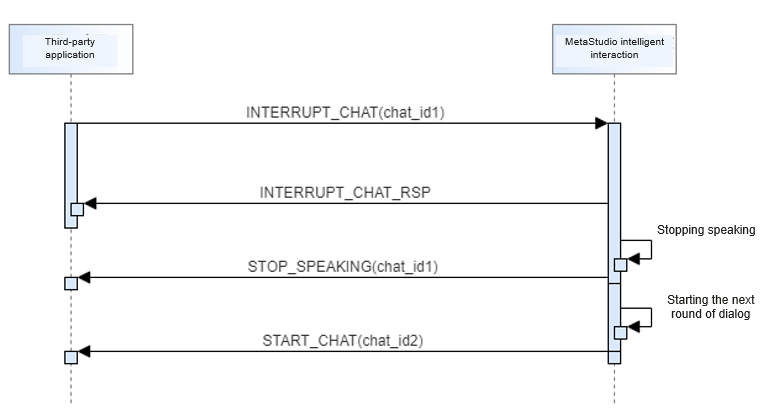
When a virtual avatar is speaking as instructed by the input text, the command INTERRUPT_CHAT can be executed to interrupt the dialog between the virtual avatar and the user. After the dialog is interrupted, the virtual avatar stops speaking and sends the message START_CHAT for the next dialog to the user.
Interaction process:
- The user sends a message for interrupting a dialog.
- After receiving the message for interrupting a dialog, MetaStudio returns a response.
- MetaStudio returns a message for interrupting a dialog to the user.
- MetaStudio sends a message for starting the next dialog.
Sending a Message for Stopping a Dialog
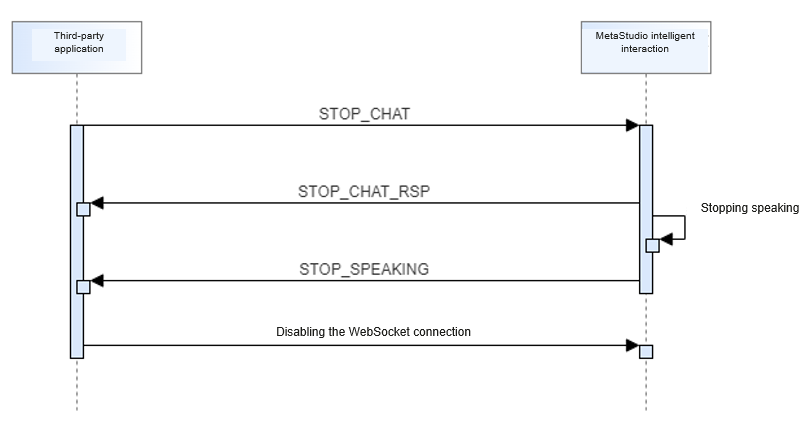
When a virtual avatar is speaking as instructed by the input text, the command STOP_CHAT can be executed to stop the dialog. After the dialog stops, the virtual avatar stops speaking and will not send the message START_CHAT for the next dialog.
Interaction process:
- The user sends a message for stopping a dialog.
{ "request_id": "d7aa08da33dd4a662ad5be508c5b77cf", "payload": { "job_id": "e37a28485f684769aa537466e719629d", "chat_id": "ac71c539395b4446865074589ffa2c6c", "command": "STOP_CHAT" } } - After receiving the message for stopping a dialog, MetaStudio returns a response.
{ "request_id": "d7aa08da33dd4a662ad5be508c5b77cf", "payload": { "command": "STOP_CHAT_RSP", "job_id": "e37a28485f684769aa537466e719629d, "chat_id": "ac71c539395b4446865074589ffa2c6c" } } - MetaStudio returns a message for stopping a dialog to the user.
Sending a Heartbeat Request
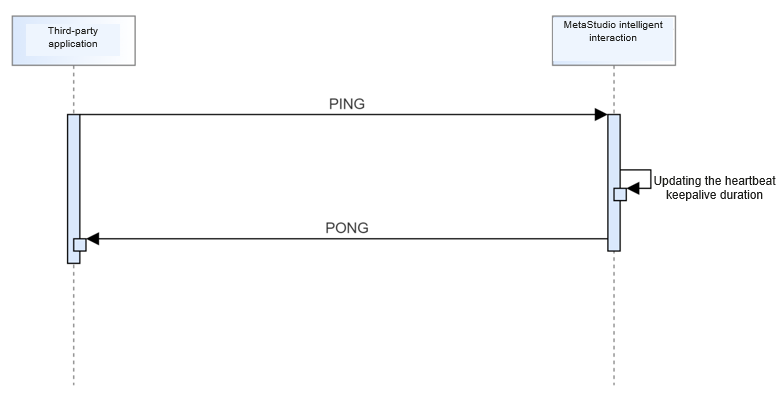
When a virtual avatar is speaking as instructed by the input text, the command PING can be executed to send a heartbeat request to keep the WebSocket connection alive.
Interaction process:
- Send a heartbeat request.
{ "request_id": "d7aa08da33dd4a662ad5be508c5b77cf", "payload": { "job_id": "e37a28485f684769aa537466e719629d", "command": "PING" } } - After receiving the heartbeat request sent by the user, MetaStudio returns a heartbeat response.
{
    "request_id": "d7aa08da33dd4a662ad5be508c5b77cf",
    "payload": {
        "command": "PONG",
        "job_id": "e37a28485f684769aa537466e719629d
    }
}
Disconnection Due to Dialog Timeout
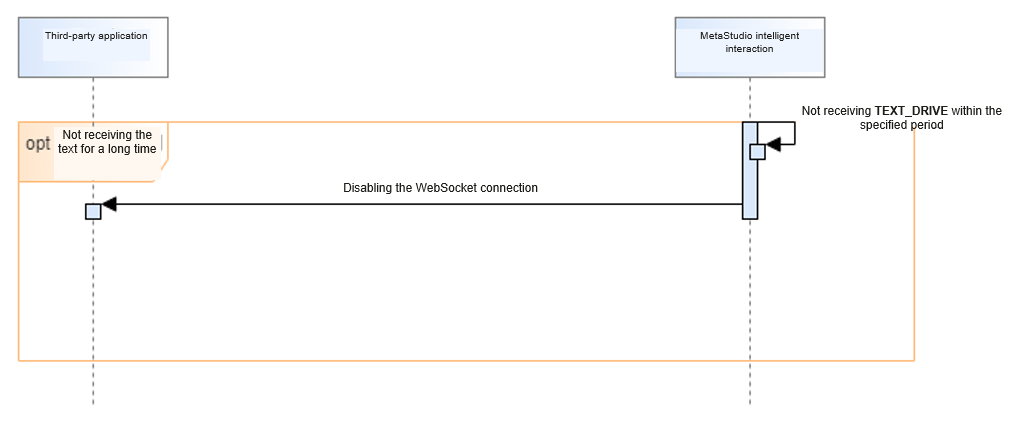
After a WebSocket connection is established between a user and MetaStudio, if the user does not send a dialog message or heartbeat request within 30 seconds, that is, MetaStudio does not receive the command TEXT_DRIVE or PING from a third-party application within 30 seconds, MetaStudio will disable the WebSocket connection.
Ending a Dialog Task
When the intelligent dialog service on MetaStudio ends, for example, the application or its dialog page is closed, MetaStudio sends the command JOB_FINISHED to the third-party application and disables the WebSocket connection.
MetaStudio sends a message for ending the task.
Code example:
{
    "request_id": "d7aa08da33dd4a662ad5be508c5b77cf",
    "payload": {
        "command": "JOB_FINISHED",
        "job_id": "e37a28485f684769aa537466e719629d
    }
} What is your overall rating for this page?
Thank you very much for your feedback. We will continue working to improve the documentation.See the reply and handling status in My Cloud VOC.
For any further questions, feel free to contact us through the chatbot.
Chatbot


