

Creating a Database
Scenarios
After your TaurusDB for PostgreSQL instance is created, you can create databases on it.
Constraints
- Databases cannot be created for DB instances that are being restored.
- Database names must be unique.
- After a database is created, its name cannot be changed.
Procedure
- Log in to the management console.
- Click
 in the upper left corner and select a region.
 - Click
 in the upper left corner of the page and choose Databases > TaurusDB.
 - On the Instances page, click the instance name.
- On the Databases page, click Create Database. In the displayed dialog box, configure required parameters and click OK. Figure 1 Creating a database
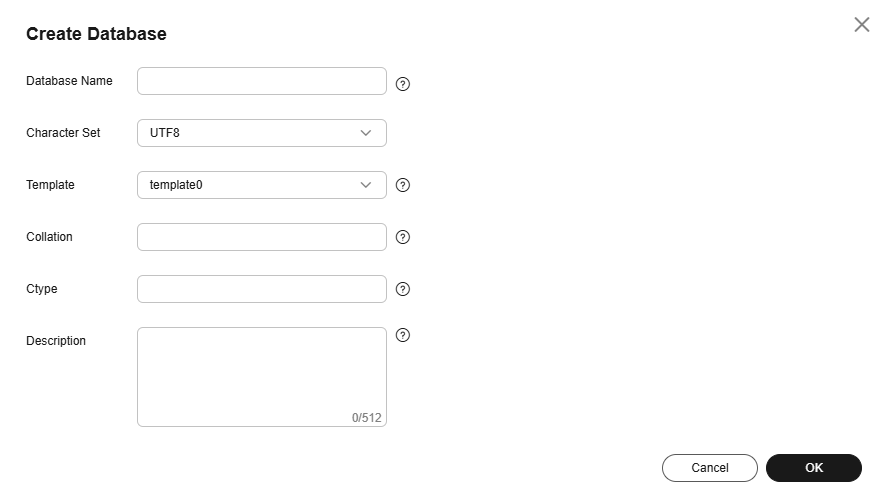
Table 1 Parameter description Parameter
Description
Database Name
The database name can contain 1 to 63 characters. Only letters, digits, and underscores (_) are allowed. It cannot start with pg or a digit and cannot be the same as TaurusDB for PostgreSQL system or template database names.
The system database of TaurusDB for PostgreSQL is postgres, and the template databases are template0 and template1.
Character Set
The default character set is UTF8. You can change it as required.
Template
Template database. You can create a database using this template. Option template1 (default) is adapted to TaurusDB for PostgreSQL and template0 complies with the PostgreSQL community settings.
Collation
A collation defines how characters are ordered. The default value is en_US.utf8. Different collations may result in varied ordering results. For example, select 'a'>'A'; is false under en_US.UTF-8, but true under 'C', and also, 'C' must be used to obtain the migration results as expected when data is migrated from Oracle to TaurusDB for PostgreSQL. Collations supported by a database can be queried from system catalog pg_collation.
Ctype
Character classification to be used in the new database (LC_CTYPE). The use of this parameter affects the classification of characters, such as lowercase letters, uppercase letters, and digits. By default, the character classification of the template database is used.
Description
The description can contain 0 to 512 characters.
- After the database is created, manage it on the Databases page.
What is your overall rating for this page?
Thank you very much for your feedback. We will continue working to improve the documentation.See the reply and handling status in My Cloud VOC.
For any further questions, feel free to contact us through the chatbot.
Chatbot


