

Collecting and Uploading NPU Logs
Description
When an NPU on a Lite Server is faulty, you can use this solution to quickly deliver an NPU log collection task. The collected logs are stored in a specified directory on Lite Server. Once authorized, your logs will be automatically uploaded to the OBS bucket provided by Huawei Cloud for fault locating and analysis.
The following logs can be collected:
- Device logs: system logs on the control CPU of the device, event-level system logs, system logs on non-control CPUs, and black box logs. When a device is abnormal, crashes, or has performance problems, you can accurately locate the root cause, shorten the troubleshooting time, and improve the O&M efficiency.
- Host logs: kernel message logs on the host, system monitoring files on the host, OS log files on the host, and kernel message log files saved on the host when the system crashes. O&M engineers can view the host monitoring data and quickly determine whether the problem is caused by the application or underlying host resources, such as full CPUs, used up memory, and full disks. Accurate locating can greatly improve troubleshooting efficiency.
- NPU environment logs: logs collected using tools such as npu-smi and hccn. By collecting such logs, you can improve O&M efficiency, ensure system stability, optimize resource usage, and facilitate root cause analysis.
Constraints
- One-click log collection is supported only for Snt9b and Snt9b21 common nodes and Snt9b23 supernodes. Manual log collection is supported for 300I Duo, Snt9b, Snt9b23, and Snt9b21.
- You can select a maximum of 50 common nodes or supernode child nodes for the same task.
- Only one task can be executed on a node at the same time. The task cannot be interrupted once started. Plan the task priority.
- Ensure that no services are running on the node. The command execution in the log collection task may interrupt or cause exceptions for the current services.
- Ensure that the space of the directory for collecting logs is greater than 1 GB.
Prerequisites
Quick log collection depends on the AI plugin preinstalled on the Lite Server. If the plugin is not installed, install it by referring to Installing the AI Plugin for a Lite Server.
One-Click Log Collection
- Log in to the ModelArts console. In the navigation pane, choose Resource Management > Lite Servers. Click the Task Center tab.
- New console: In the navigation pane, choose Resource Management > Lite Compute Resources > Lite Servers.
- Old console: In the navigation pane, choose Resource Management > Lite Servers.
- Click Create Task in the upper right corner. On the displayed Job Templates page, locate Log Collection, and click Create Task. Figure 1 Task template

- On the Log Collection page, enter the task name and description. Set server model and node type, select collection items, select the term of use, and click Create now.
Table 1 Parameters for creating a task Parameter
Description
Name
The system automatically generates a task name. You can change the name as required.
Description
Enter the task description for quick search.
Template Parameters
Enter the node directory on the Lite Server for storing logs. The default value is /root/log_collection.

Server Model
Snt9b and Snt9b21 common nodes and Snt9b23 supernodes are supported.
Collection Items
Select Device side log, Host side log, NPU environment log, or all of them.
- Device logs: system logs on the control CPU of the device, event-level system logs, system logs on non-control CPUs, and black box logs.
- Host logs: kernel message logs on the host, system monitoring files on the host, OS log files on the host, and kernel message log files saved on the host when the system crashes.
- NPU environment logs: logs collected using tools such as npu-smi and hccn.
- Enable Log upload to upload collected logs to OBS for Huawei engineers to analyze logs. Click Create now.
- View the task execution status in the Task Center tab.
- Click the task name to access its details page, where you can view the task details.
- On the task details page, locate the target node and click View Logs in the Operation column. In the displayed window on the right, view the detailed log about task execution. In the Task Center tab, you can view all log collection results and check whether logs are collected and uploaded.
Manually Collecting Logs
- Obtain the AK/SK, which are used for script configuration, as well as authentication and authorization.
If an AK/SK pair is already available, skip this step. Find the downloaded AK/SK file, which is usually named credentials.csv.
The file contains the username, AK, and SK.
Figure 2 credential.csv
 To generate an AK/SK pair, follow these steps:
- Log in to the Huawei Cloud console.
- Hover the cursor over the username in the upper right corner and choose My Credentials from the drop-down list.
- In the navigation pane on the left, choose Access Keys.
- Click Create Access Key.
- Download the key and keep it secure.
-
Prepare the tenant ID and IAM ID for OBS bucket configuration.
Send the prepared information to technical support, who will configure an OBS bucket policy based on your information. You can upload the collected logs to the corresponding OBS bucket.
After the configuration, the OBS directory obs_dir is provided for you to configure subsequent scripts.
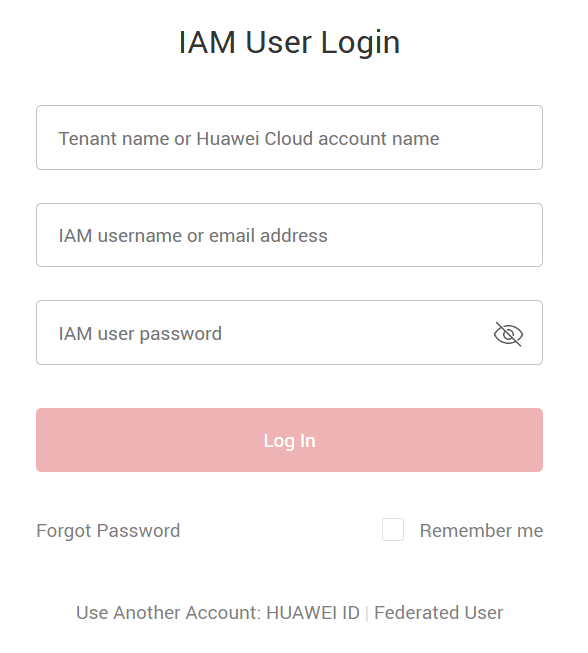
Figure 3 Tenant and IAM accounts
- Collect the logs and upload the script. Modify the NpuLogCollection parameter in the script below. Replace ak, sk, and obs_dir with the values obtained in the previous steps. For the 300I Duo model, set is_300_iduo to True. Upload the script to the node whose NPU logs need to be collected.
import json import os import sys import hashlib import hmac import binascii import subprocess import re from datetime import datetime class NpuLogCollection(object): NPU_LOG_PATH = "/var/log/npu_log_collect" SUPPORT_REGIONS = ['cn-southwest-2', 'cn-north-9', 'cn-east-4', 'cn-east-3', 'cn-north-4', 'cn-south-1'] OPENSTACK_METADATA = "http://169.254.169.254/openstack/latest/meta_data.json" OBS_BUCKET_PREFIX = "npu-log-" def __init__(self, ak, sk, obs_dir, is_300_iduo=False): self.ak = ak self.sk = sk self.obs_dir = obs_dir self.is_300_iduo = is_300_iduo self.region_id = self.get_region_id() self.card_ids, self.chip_count, self.device_ids = self.get_card_ids() def get_region_id(self): meta_data = os.popen("curl {}".format(self.OPENSTACK_METADATA)) json_meta_data = json.loads(meta_data.read()) meta_data.close() region_id = json_meta_data["region_id"] if region_id not in self.SUPPORT_REGIONS: print("current region {} is not support.".format(region_id)) raise Exception('region exception') return region_id def gen_collect_npu_log_shell(self): # 300IDUO does not support hccn_tool_log_shell = "echo {npu_network_info}\n" \ "for i in {npu_card_ids}; do hccn_tool -i $i -net_health -g >> {npu_log_path}/npu-smi_net-health.log ;done\n" \ "for i in {npu_card_ids}; do hccn_tool -i $i -link -g >> {npu_log_path}/npu-smi_link.log ;done\n" \ "for i in {npu_card_ids}; do hccn_tool -i $i -tls -g |grep switch >> {npu_log_path}/npu-smi_switch.log;done\n" \ "for i in {npu_card_ids}; do hccn_tool -i $i -optical -g | grep prese >> {npu_log_path}/npu-smi_present.log ;done\n" \ "for i in {npu_card_ids}; do hccn_tool -i $i -link_stat -g >> {npu_log_path}/npu_link_history.log ;done\n" \ "for i in {npu_card_ids}; do hccn_tool -i $i -ip -g >> {npu_log_path}/npu_roce_ip_info.log ;done\n" \ "for i in {npu_card_ids}; do hccn_tool -i $i -lldp -g >> {npu_log_path}/npu_nic_switch_info.log ;done\n" \ .format(npu_log_path=self.NPU_LOG_PATH, npu_card_ids=self.device_ids, npu_network_info="collect npu network info") collect_npu_log_shell = "# !/bin/sh\n" \ "step=1\n" \ "rm -rf {npu_log_path}\n" \ "mkdir -p {npu_log_path}\n" \ "echo {echo_npu_driver_info}\n" \ "npu-smi info > {npu_log_path}/npu-smi_info.log\n" \ "cat /usr/local/Ascend/driver/version.info > {npu_log_path}/npu-smi_driver-version.log\n" \ "/usr/local/Ascend/driver/tools/upgrade-tool --device_index -1 --component -1 --version > {npu_log_path}/npu-smi_firmware-version.log\n" \ "for i in {npu_card_ids}; do for ((j=0;j<{chip_count};j++)); do npu-smi info -t health -i $i -c $j; done >> {npu_log_path}/npu-smi_health-code.log;done;\n" \ "for i in {npu_card_ids}; do npu-smi info -t board -i $i >> {npu_log_path}/npu-smi_board.log; done;\n" \ "echo {echo_npu_ecc_info}\n" \ "for i in {npu_card_ids};do npu-smi info -t ecc -i $i >> {npu_log_path}/npu-smi_ecc.log; done;\n" \ "lspci | grep acce > {npu_log_path}/Device-info.log\n" \ "echo {echo_npu_device_log}\n" \ "cd {npu_log_path} && msnpureport -f > /dev/null\n" \ "tar -czvPf {npu_log_path}/log_messages.tar.gz /var/log/message* > /dev/null\n" \ "tar -czvPf {npu_log_path}/ascend_install.tar.gz /var/log/ascend_seclog/* > /dev/null\n" \ "echo {echo_npu_tools_log}\n" \ "tar -czvPf {npu_log_path}/ascend_toollog.tar.gz /var/log/nputools_LOG_* > /dev/null\n" \ .format(npu_log_path=self.NPU_LOG_PATH, npu_card_ids=self.card_ids, chip_count=self.chip_count, echo_npu_driver_info="collect npu driver info.", echo_npu_ecc_info="collect npu ecc info.", echo_npu_device_log="collect npu device log.", echo_npu_tools_log="collect npu tools log.") if self.is_300_iduo: return collect_npu_log_shell return collect_npu_log_shell + hccn_tool_log_shell def collect_npu_log(self): print("begin to collect npu log") os.system(self.gen_collect_npu_log_shell()) date_collect = datetime.now().strftime('%Y%m%d%H%M%S') instance_ip_obj = os.popen("curl http://169.254.169.254/latest/meta-data/local-ipv4") instance_ip = instance_ip_obj.read() instance_ip_obj.close() log_tar = "%s-npu-log-%s.tar.gz" % (instance_ip, date_collect) os.system("tar -czvPf %s %s > /dev/null" % (log_tar, self.NPU_LOG_PATH)) print("success to collect npu log with {}".format(log_tar)) return log_tar def upload_log_to_obs(self, log_tar): obs_bucket = "{}{}".format(self.OBS_BUCKET_PREFIX, self.region_id) print("begin to upload {} to obs bucket {}".format(log_tar, obs_bucket)) obs_url = "https://%s.obs.%s.myhuaweicloud.com/%s/%s" % (obs_bucket, self.region_id, self.obs_dir, log_tar) date = datetime.utcnow().strftime('%a, %d %b %Y %H:%M:%S GMT') canonicalized_headers = "x-obs-acl:public-read" obs_sign = self.gen_obs_sign(date, canonicalized_headers, obs_bucket, log_tar) auth = "OBS " + self.ak + ":" + obs_sign header_date = '\"' + "Date:" + date + '\"' header_auth = '\"' + "Authorization:" + auth + '\"' header_obs_acl = '\"' + canonicalized_headers + '\"' cmd = "curl -X PUT -T " + log_tar + " -w %{http_code} " + obs_url + " -H " + header_date + " -H " + header_auth + " -H " + header_obs_acl result = subprocess.run(cmd, shell=True, capture_output=True, text=True) http_code = result.stdout.strip() if result.returncode == 0 and http_code == "200": print("success to upload {} to obs bucket {}".format(log_tar, obs_bucket)) else: print("failed to upload {} to obs bucket {}".format(log_tar, obs_bucket)) print(result) # calculate obs auth sign def gen_obs_sign(self, date, canonicalized_headers, obs_bucket, log_tar): http_method = "PUT" canonicalized_resource = "/%s/%s/%s" % (obs_bucket, self.obs_dir, log_tar) IS_PYTHON2 = sys.version_info.major == 2 or sys.version < '3' canonical_string = http_method + "\n" + "\n" + "\n" + date + "\n" + canonicalized_headers + "\n" + canonicalized_resource if IS_PYTHON2: hashed = hmac.new(self.sk, canonical_string, hashlib.sha1) obs_sign = binascii.b2a_base64(hashed.digest())[:-1] else: hashed = hmac.new(self.sk.encode('UTF-8'), canonical_string.encode('UTF-8'), hashlib.sha1) obs_sign = binascii.b2a_base64(hashed.digest())[:-1].decode('UTF-8') return obs_sign # get NPU Id and Chip count def get_card_ids(self): card_ids = [] cmd = "npu-smi info -l" result = subprocess.run(cmd, shell=True, capture_output=True, text=True) if result.returncode != 0: print("failed to execute command[{}]".format(cmd)) return "" match = re.search(r'Chip Count\s*:\s*(\d+)', result.stdout) # default chip count is 1, 300IDUO or 910C is 2 chip_count = 1 if match and int(match.group(1)) > 0: chip_count=int(match.group(1)) # filter NPU ID Regex pattern = re.compile(r'NPU ID(.*?): (.*?)\n', re.DOTALL) matches = pattern.findall(result.stdout) for match in matches: if len(match) != 2: continue id = int(match[1]) # if drop card if id < 0: print("Card may not be found, NPU ID: {}".format(id)) continue card_ids.append(id) print("success to get card id {}, Chip Count {}".format(card_ids, chip_count)) device_ids = [] for card in card_ids: for i in range(chip_count): device_ids.append(card * chip_count + i) return " ".join(str(x) for x in card_ids), chip_count, " ".join(str(x) for x in device_ids) def execute(self): if self.obs_dir == "": print("the obs_dir is null, please enter a correct dir") else: log_tar = self.collect_npu_log() self.upload_log_to_obs(log_tar) if __name__ == '__main__': npu_log_collection = NpuLogCollection(ak='ak', sk='sk', obs_dir='obs_dir', is_300_iduo=False) npu_log_collection.execute() - Run the script to collect logs.
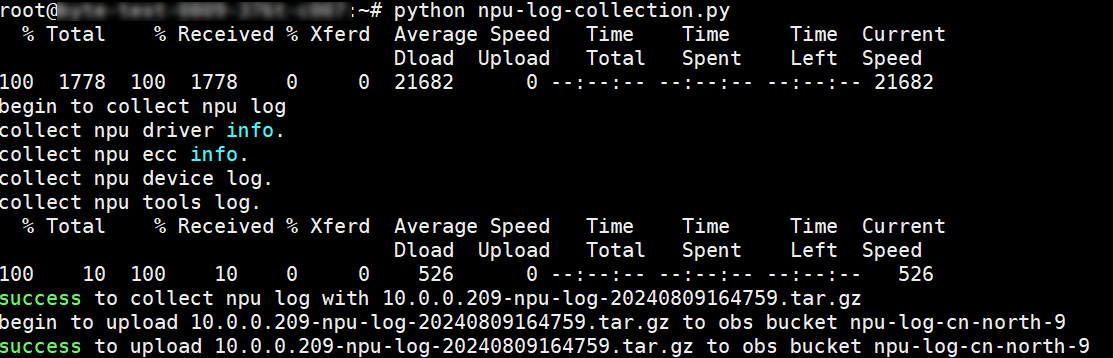
Run the script on the node. If the following information is displayed, logs are collected and uploaded to OBS.
Figure 4 Log uploaded
- View the uploaded log package in the directory where the script is stored. Figure 5 Viewing the result

What is your overall rating for this page?
Thank you very much for your feedback. We will continue working to improve the documentation.See the reply and handling status in My Cloud VOC.
For any further questions, feel free to contact us through the chatbot.
Chatbot


