

Creating a Cloud Service Agency (dlg_agency)
Scenario
DataArts Studio works with other cloud services, such as Data Lake Insight (DLI), Object Storage Service (OBS), Data Warehouse Service (DWS), Simple Message Notification (SMN), and MapReduce Service (MRS). To enable DataArts Studio to operate these services on your behalf, you need to create an agency to grant the operation permissions to DataArts Studio.
If you do not create an agency, the following core functions will be unavailable:
- DataArts Migration: You cannot read or write data sources such as OBS and DWS.
- DataArts Factory: You cannot schedule DWS jobs.
- DataArts Quality: SMN alarm notifications cannot be sent.
Notes and Constraints
- Only users with Security Administrator permissions can create cloud service agencies.
- The default dlg_agency does not have the permissions required for DataArts Security. Before using DataArts Security, you need to grant the required permissions to the dlg_agency. For details, see Authorizing dlg_agency.
- During one-click optimization of DataArts Studio agency permissions, the system first grants the minimum permissions to the dlg_agency and then deletes excessive permissions. However, it may take up to 10 minutes for the permissions granted to dlg_agency to take effect. During this period, an error may occur due to insufficient permissions. Therefore, you are advised to perform the operation during off-peak hours or manually optimize the permissions. For details, see Minimizing Permissions for an Agency.
Prerequisites
- You have created an account.
- Your account has the Security Administrator permissions.
Creating the dlg_agency Default Agency
When you log in to the DataArts Studio console for the first time, there is no dlg_agency, and an authorization dialog box is displayed.
- Log in to Huawei Cloud console as a security administrator.
- In the upper left corner of the console, click
 and choose DataArts Studio to access the DataArts Studio console.
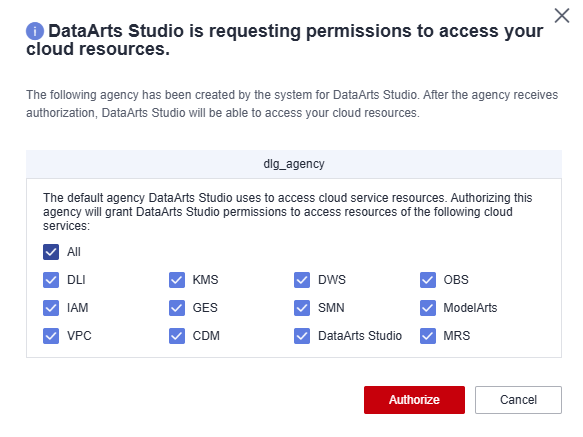
- The DataArts Studio is requesting permissions to access your cloud resources dialog box is displayed, prompting you to authorize the listed services.
- Select required services (you are advised to select all services) and click Authorize. The system automatically creates the default dlg_agency. After the authorization is complete, this dialog box will not be displayed when you access the DataArts Studio console next time.

- Cloud service agencies include permissions related to DWS, MRS, RDS, OBS, SMN, and KMS. You can access the Agencies page on the IAM console to view the agency scope.
- You do not need to apply for an agency for users. The agency of the account is used.
- Only users with Security Administrator permissions can create cloud service agencies.
- You are advised to select all related services. If you only select some services, the system will not prompt you to authorize the remaining services in the future. You may encounter errors due to insufficient agency permissions. You can manually configure the permissions by referring to Minimizing Agency Permissions.
Figure 1 Authorizing DataArts Studio to use cloud resources
Minimizing Agency Permissions
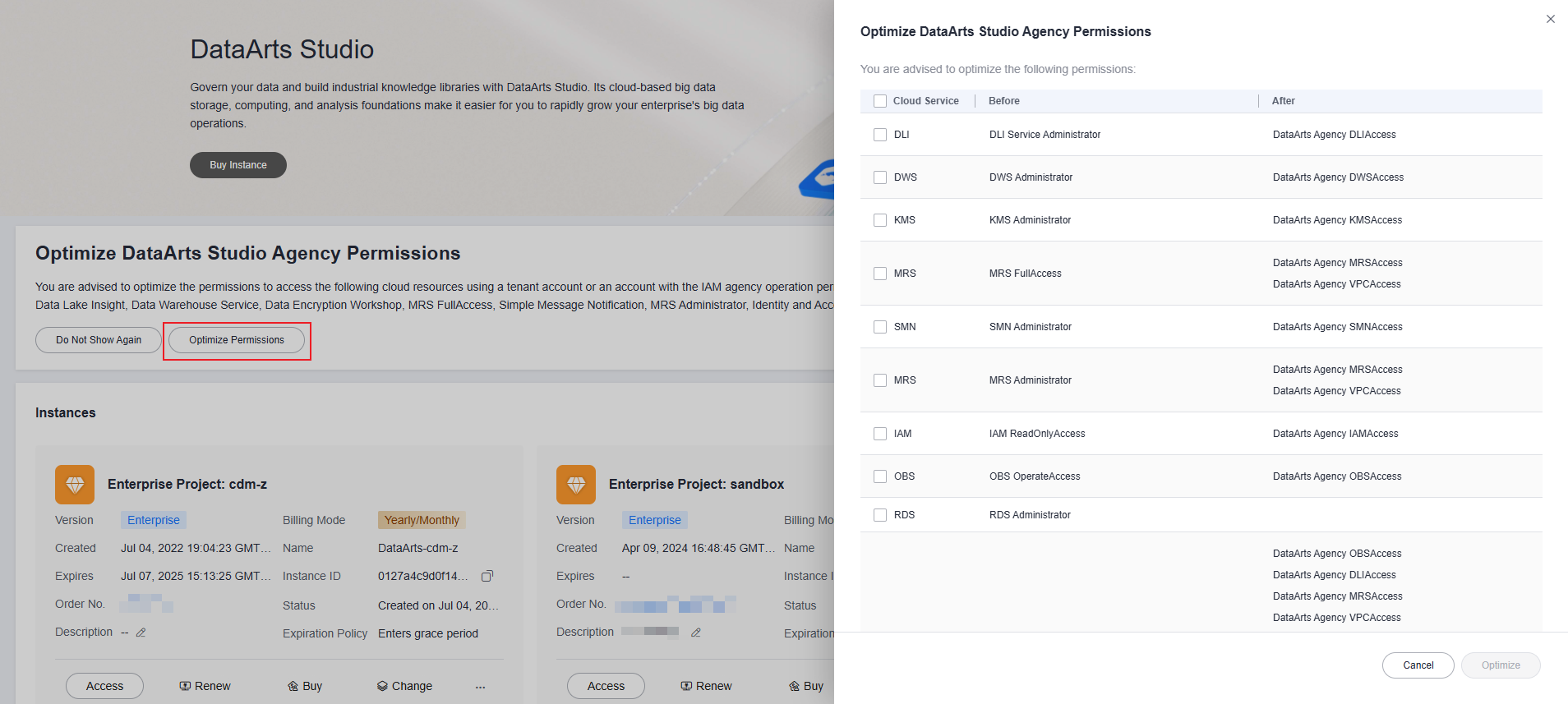
The dlg_agency automatically created by DataArts Studio has the administrator permissions of services such as DWS, MRS, RDS, OBS, SMN, and KMS by default. To prevent risks caused by excessive permissions, you can minimize the permissions of the automatically created dlg_agency on related cloud services. This function is supported in some regions (it is supported if Optimize DataArts Studio Agency Permissions is displayed). In addition, one-click permission minimization is supported for existing agencies.
In regions where agency permission minimization is available, you can click Optimize Permissions in Optimize DataArts Studio Agency Permissions on the DataArts Studio instance list page. In the displayed dialog box, select the permissions to optimize and click Optimize to optimize the agency permissions.
- During one-click optimization of DataArts Studio agency permissions, the system first grants the minimum permissions to the dlg_agency and then deletes excessive permissions. However, it may take up to 10 minutes for the permissions granted to dlg_agency to take effect. During this period, an error may occur due to insufficient permissions. Therefore, you are advised to perform the operation during off-peak hours or manually optimize the permissions. For details, see Minimizing Permissions for an Agency.
- If agency permission minimization is not supported in your region, you can manually adjust the permissions by referring to Minimizing Permissions for an Agency
What is your overall rating for this page?
Thank you very much for your feedback. We will continue working to improve the documentation.See the reply and handling status in My Cloud VOC.
For any further questions, feel free to contact us through the chatbot.
Chatbot


