

Updated on 2026-05-14 GMT+08:00
Using MR Pre-merging
Introduction
Pre-merging an MR generates a temporary merge node in the repository. When the code in the MR has not been merged, you can download the pre-merge code via plugin scripts such as custom webhooks or pipelines for code building.
Advantages:
- In the MR merging process involving dozens or hundreds of servers for code building, the local client pre-merging result may be different from that generated by the server and yield inaccurate build.
- Enabling MR pre-merge can solve this real-time issue, as the build script commands are simpler compared to local pre-merging scripts, making it easier for developers to get started.
Constraints
- MR pre-merge must be enabled.
- You need to have the set permission. For details, see Configuring Project-Level Permissions.
Example
The following example shows the difference between the scripts with Pre-merge enabled and disabled. The former one is more simple and efficient.
- MR pre-merge enabled: When an MR is created, a temporary merge node will be generated on the server. You can download the code that has been temporarily merged. Steps are provided as follows:
- Initialize the local repository. In the command, $repo_url indicates the address of the target repository.
git init git remote add origin ${repo_url} - Pulls the temporary merge node from the server to the local branch.
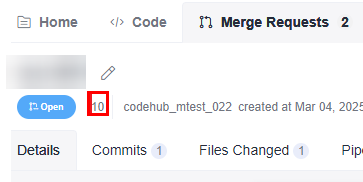
git fetch origin +refs/merge-requests/${repo_MR_iid}/merge:refs/remotes/origin/${repo_MR_iid}/merge- As shown in the following figure, 10 under the merge request title is repo_MR_iid. Figure 1 MR IID
- merge-requests/${repo_MR_iid}/merge indicates the temporary merge node.
- As shown in the following figure, 10 under the merge request title is repo_MR_iid.
- Check out the branch and the pre-merged code is obtained.
git checkout ${repo_MR_iid}/merge
- MR pre-merge disabled: You need to download the code of the MR source and target branches on the client and merge on your build executor. Steps are provided as follows:
- Initialize the local repository. In the command, repo_url indicates the address of the target repository.
git init git remote add origin ${repo_url} - Pull and check the target branch of the MR. The repoTargetBranch represents the target branch of the MR.
git fetch origin +refs/heads/${repoTargetBranch}:refs/remotes/origin/${repoTargetBranch} git checkout ${repoTargetBranch} - Pull the source branch of the merge request to the local branch.
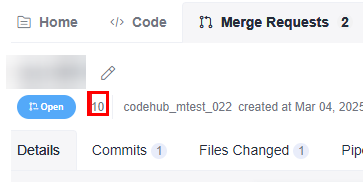
git fetch origin +refs/merge-requests/${repo_MR_iid}/head:refs/remotes/origin/${repo_MR_iid}/head- As shown in the following figure, 10 under the merge request title is repo_MR_iid.
Figure 2 MR IID
- merge-requests/${repo_MR_iid}/head indicates the source branch of the merge request.
- Merge locally and the pre-merged code is generated.
git merge refs/remotes/origin/${repo_MR_iid}/head --no-edit
Parent topic: Configuring Repository Settings
What is your overall rating for this page?
0
1
2
3
4
5
6
7
8
9
10
Very dissatisfiedVery satisfied
Thank you very much for your feedback. We will continue working to improve the documentation.See the reply and handling status in My Cloud VOC.
The system is busy. Please try again later.
For any further questions, feel free to contact us through the chatbot.
Chatbot


