

Drive Hints
Function
During query plan generation, the optimizer uses dynamic programming or genetic algorithms to enumerate potential join paths and selects the optimal one. As the number of join tables increases, the search space may expand excessively. For such cases, a drive hint can be used to designate the fact table in the query, reducing the scope of the path search space through heuristic search. This hint takes effect only when the GUC parameter join_search_mode is set to heuristic.
Syntax
1 | [no] drive (table) |
Parameter Description
- no: indicates that the table specified by the hint is not a drive table.
- table: indicates the table to be hinted. Only one table can be specified. If the table has an alias, the alias should be prioritized for the hint.
Examples
Create tables t1, t2, and t3.
1 2 3 | create table t1(a1 int,b1 int,c1 int,d1 int) store as orc; create table t2(a2 int,b2 int,c2 int,d2 int) store as orc; create table t3(a3 int,b3 int,c3 int,d3 int) store as orc; |
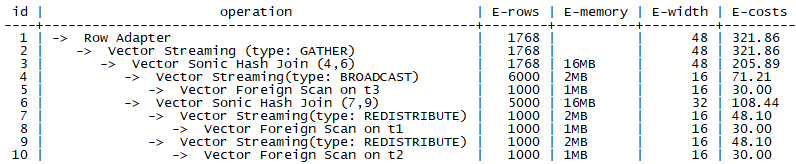
The original statement is as follows:
1 | explain select * from t1,t2,t3 where t1.b1=t2.b2 and t1.c1=t3.c3 and t2.d2=t3.d3; |
explain select /*+ drive(t3) */ * from t1, t2, t3 where t1.b1=t2.b2 and t1.c1=t3.c3 and t2.d2=t3.d3;
Result after hints are used:
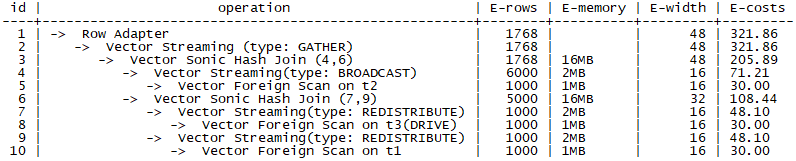

When the GUC parameter join_search_mode is set to heuristic and the number of join tables exceeds from_collapse_limit, the optimizer automatically identifies the drive table and displays it in the plan. If the drive table identified by the optimizer is incorrect, the no drive hint can be used for correction.
What is your overall rating for this page?
Thank you very much for your feedback. We will continue working to improve the documentation.See the reply and handling status in My Cloud VOC.
For any further questions, feel free to contact us through the chatbot.
Chatbot


