

Updated on 2026-11-05 GMT+08:00
Can I Disable Remote Login Detection?
No.
If you do not want to receive remote login alarm notifications, add alarmed locations as common login locations, or deselect the remote login attempt item in alarm notification settings.
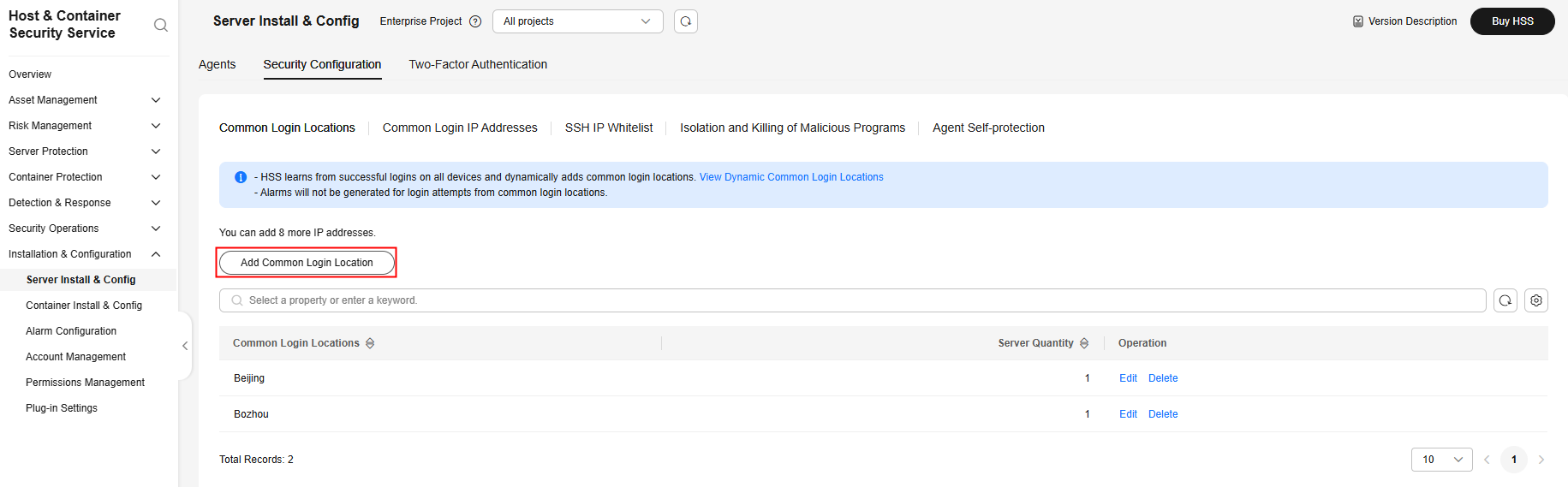
- On the Common Login Locations tab, click Add Common Login Location, and add common login locations. HSS does not trigger remote login alarms on logins from common login locations. Figure 1 Adding a common login location
- On the tab. Deselect Abnormal login in the alarm item list. Exercise caution when you disable the Abnormal login notification item. Abnormal logins include remote logins and successful hacks. If you deselect this item, you will not receive alarms on brute-force attacks in real time.Figure 2 Deselecting abnormal logins

Parent topic: Abnormal Logins
What is your overall rating for this page?
0
1
2
3
4
5
6
7
8
9
10
Very dissatisfiedVery satisfied
Thank you very much for your feedback. We will continue working to improve the documentation.See the reply and handling status in My Cloud VOC.
The system is busy. Please try again later.
For any further questions, feel free to contact us through the chatbot.
Chatbot


