

How Are Default Keys Generated?
A default key is automatically created by another cloud service using KMS, such as Object Storage Service (OBS). The alias of a default key ends with /default. Table 1 lists the default key aliases used by cloud services through KMS.
You can use the management console to query but cannot disable or schedule the deletion of default keys.
Default keys are hosted for free, and are charged based on the number of the API requests for them. If API requests exceed the free limit, the excess part will be charged.
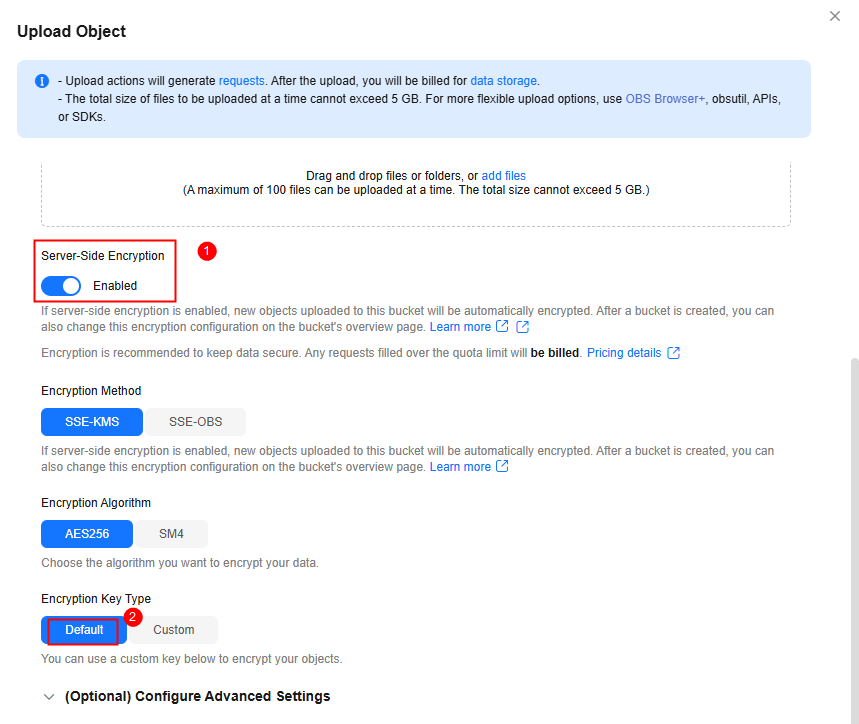
For example, when you upload an object on OBS, enable Server-Side Encryption, and set Encryption Key Type to Default, OBS will use KMS to generate a default key whose alias is obs/default.
| Alias | Cloud Service | Remarks |
|---|---|---|
| obs/default | Object Storage Service (OBS) | Select this key on the corresponding service console for encryption configuration. |
| evs/default | Elastic Volume Service (EVS) | Select this key on the corresponding service console for encryption configuration. |
| ims/default | Image Management Service (IMS) | Select this key on the corresponding service console for encryption configuration. |
| vbs/default | Volume Backup Service (VBS) | The corresponding cloud service automatically creates and uses the key. You may not be able to view the key on the KMS console. |
| sfs/default | Scalable File Service (SFS) | The corresponding cloud service automatically creates and uses the key. You may not be able to view the key on the KMS console. |
| kps/default | Key Pair Service (KPS) | Select this key on the corresponding service console for encryption configuration. |
| csms/default | Cloud Secret Management Service (CSMS) | Select this key on the corresponding service console for encryption configuration. |
| dlf/default | DataArts Studio | The corresponding cloud service automatically creates and uses the key. You may not be able to view the key on the KMS console. |
| dds/default | Document Database Service (DDS) | The corresponding cloud service automatically creates and uses the key. You may not be able to view the key on the KMS console. |
| elb/default | Elastic Load Balance (ELB) | The corresponding cloud service automatically creates and uses the key. You may not be able to view the key on the KMS console. |
| mkp/default | KooGallery | The corresponding cloud service automatically creates and uses the key. You may not be able to view the key on the KMS console. |
| coc/default | Cloud Operations Center (COC) | Select this key on the corresponding service console for encryption configuration. |
| cce/default | Cloud Container Engine (CCE) | The corresponding cloud service automatically creates and uses the key. You may not be able to view the key on the KMS console. |
| agentarts/default | AgentArts |
|
What is your overall rating for this page?
Thank you very much for your feedback. We will continue working to improve the documentation.See the reply and handling status in My Cloud VOC.
For any further questions, feel free to contact us through the chatbot.
Chatbot


