

Help Center/ Server Migration Service/ Best Practices/ Guidance on Migrating Tencent Cloud CVM to Huawei Cloud ECS/ Procedure/ Synchronizing and Verifying Incremental Data
Updated on 2026-08-05 GMT+08:00
Synchronizing and Verifying Incremental Data
This section describes how to synchronize incremental data from the source server to the target server.
Precautions
You can perform this operation for multiple times. Remember to stop services on the source server before the final synchronization. Otherwise, you will need to repeat the synchronization for new data.
Constraints
You can synchronize the incremental data from a source server only when the migration status is Finished.
Synchronizing and Verifying Incremental Data
- In the server list, locate the source server you want to synchronize, and click Sync above the list, or choose More > Sync in the Operation column.
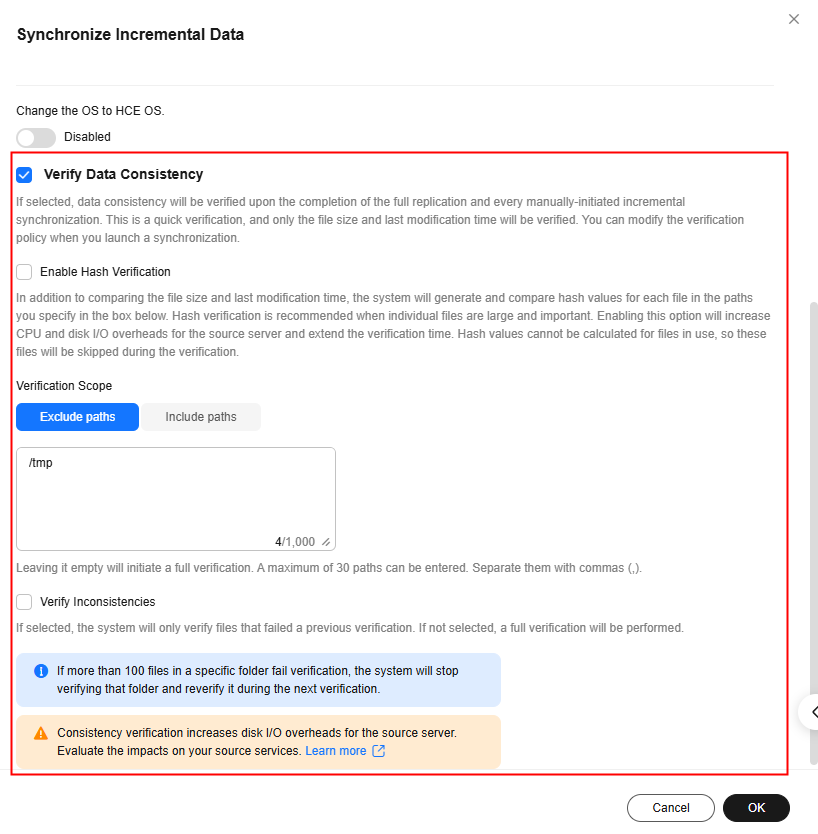
- In the Synchronize Incremental Datadialog box, carefully read the tips, enable Verify Data Consistency if needed, and click OK. For details about this option, see How Do I Verify Data Consistency Between the Source and Target Servers?
- Click the server name to check the synchronization progress. Wait until the task status changes to Complete.
What is your overall rating for this page?
0
1
2
3
4
5
6
7
8
9
10
Very dissatisfiedVery satisfied
Thank you very much for your feedback. We will continue working to improve the documentation.See the reply and handling status in My Cloud VOC.
The system is busy. Please try again later.
For any further questions, feel free to contact us through the chatbot.
Chatbot


