

Using a Dedicated Load Balancer at Layer 4 to Transfer Client IP Addresses
Scenarios
When you are using ELB to distribute traffic, you may need to obtain the real IP addresses of clients for further analysis, especially in typical service scenarios such as security, data analysis, user behavior analysis, and troubleshooting.
When forwarding Layer 4 requests, load balancers communicate with backend servers using the client IP addresses by default. However, in certain cases, such as when a load balancer communicates with IP as backend servers, when IPv4/IPv6 translation is enabled for TCP and UDP listeners, or when TLS listeners are used for forwarding traffic, client IP addresses are translated by the load balancer. You can refer to this section to obtain client IP addresses.
Constraints
- If you are using a NAT gateway, you cannot obtain the IP addresses of the clients.
- If the client is a container, you can obtain only the IP address of the node where the container is located, but cannot obtain the IP address of the container.
- Transfer Client IP Address is enabled by default for TCP and UDP listeners. A cloud server cannot be used as a backend server and a client at the same time.
If this happens, the backend server will think the packet from the client is sent by itself and will not return a response packet to the load balancer.
Transferring Client IP Addresses
Transfer Client IP Address is enabled by default for TCP and UDP listeners of dedicated load balancers. Load balancers communicate with backend servers using client IP addresses.
In some special cases, Transfer Client IP Address does not work. You can obtain client IP addresses by referring to Table 1.
| Listener Protocol | Transfer Client IP Address | Transferring Client IP Addresses in Special Cases |
|---|---|---|
| TCP | Transferring Client IP Addresses When TCP or UDP Listeners Are Used | Transfer Client IP Address does not work in the following scenarios. You can configure the TOA plug-in or use Proxy Protocol to obtain the client IP addresses.
NOTE: Proxy Protocol for TCP listeners is available in certain regions. You can see which regions support this feature on the console. If you want to use this feature, submit a service ticket. |
| UDP | Transferring Client IP Addresses When TCP or UDP Listeners Are Used | Client IP addresses cannot be obtained in the following scenarios:
|
| TLS | Not supported |
Transferring Client IP Addresses When TCP or UDP Listeners Are Used
When TCP and UDP listeners are used to forward traffic, load balancers communicate with backend servers using the client IP addresses by default. Without any additional operations, you can check the backend server logs to determine whether the client IP address is obtained.
For a Nginx server, perform the following steps:
- Run the following command to modify the HTTP configuration block and configure access logs for the Nginx server:
http {
      log_format main '$remote_addr- $remote_user [$time_local] "$request" '
                      '$status $body_bytes_sent "http_referer" '
                      '"$http_user_agent" "$http_x_forwarded_for"';
      }
Figure 1 Configuring the access log

- Check the Nginx access logs to obtain the client IP address.
cat /path/server/nginx/logs/access.log
In the log, the first IP address is the real IP address of the client.
Figure 2 Viewing access logs of a Nginx server

Transferring Client IP Addresses in Special Cases
- TCP listeners communicate with IP as backend servers.
- IPv4/IPv6 translation is enabled for TCP listeners.
In these cases, you can refer to the following methods to obtain the client IP addresses.
Configuring the TOA Plug-in to Transfer Client IP Addresses
You can install the TCP Option Address (TOA) kernel on the backend servers of a load balancer to extract client IPv4 addresses.
In extreme cases, if the TCP Options field in packets sent to the load balancer is full, the load balancer cannot write the real IP address of the client into the TCP Options field. As a result, a backend server cannot obtain the real IP address of the client that accesses the load balancer through the TOA plug-in.
Using Proxy Protocol to Transfer Client IP Addresses
You can enable Proxy Protocol on listeners and ensure that the backend servers can translate Proxy Protocol to transfer client IP addresses.

Ensure that the backend servers can translate Proxy Protocol. If they do not, services may be interrupted.
For details, see the following procedure.
Step 2: Configure Backend Servers to Support Proxy Protocol
The following uses a backend server that runs CentOS 7.5 as an example to describe how to install Nginx on the server.
- Run the following commands to install http_realip_module:
yum -y install gcc pcre pcre-devel zlib zlib-devel openssl openssl-devel
wget http://nginx.org/download/nginx-1.17.0.tar.gz
tar zxvf nginx-1.17.0.tar.gz
cd nginx-1.17.0
./configure --prefix=/path/server/nginx --with-http_stub_status_module --without-http-cache --with-http_ssl_module --with-http_realip_module
make
make install
- Open the Nginx configuration file nginx.conf.
vi /path/server/nginx/conf/nginx.conf
- Modify the server configuration block.
- Enable Proxy Protocol listening.
- Configure real IP address extraction.
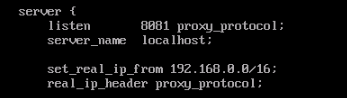
server {
   listen 8081 proxy_protocol;
   server_name localhost;

   set_real_ip_from 192.168.0.0/16;
   real_ip_header proxy_protocol;
 }
Enter the CIDR block of the proxy server as the value of set_real_ip_from. For dedicated load balancers, enter the CIDR block of its backend subnet.
Figure 3 Modifying the server configuration block in the Nginx configuration file
- Modify the http configuration block and configure access logs.
http {
    log_format main '$remote_addr- $remote_user [$time_local] "$request"'
                  '$status $body_bytes_sent "$http_referer" '
                  '"$http_user_agent" "$proxy_protocol_addr" ';

}
Figure 4 Modifying the http configuration block in the Nginx configuration file

- Start Nginx.
/path/server/nginx/sbin/nginx
Step 3: Verify Transferring Client IP Addresses to the Backend Server
Run the following command to check the client IP addresses in the access logs:
cat /path/server/nginx/logs/access.log

What is your overall rating for this page?
Thank you very much for your feedback. We will continue working to improve the documentation.See the reply and handling status in My Cloud VOC.
For any further questions, feel free to contact us through the chatbot.
Chatbot


