

Help Center/ Organizations/ User Guide/ Managing Trusted Services/ Specifying, Viewing, or Removing a Delegated Administrator
Updated on 2026-01-26 GMT+08:00
Specifying, Viewing, or Removing a Delegated Administrator

- Before removing the delegated administrator of the trusted service AOM, delete the multi-account instances on the AOM console and then access the Organizations console to start removal. Otherwise, the multi-account instances will continue retrieving the member accounts' metric data.
- Before removing the delegated administrator of the trusted service LTS, delete the configurations of multi-account log aggregation on the LTS console and then access the Organizations console to start removal. Otherwise, the multi-account log aggregation will continue retrieving the member accounts' logs.
Specifying a Delegated Administrator
An account being closed cannot be specified as a delegated administrator.
- Log in to the Organizations console as an organization administrator or using the management account.
- On the Services page, locate the target trusted service and click Specify Delegated Administrator in the Operation column.

- Select the account to be specified as the delegated administrator, and click OK.
Viewing a Delegated Administrator
- Log in to the Organizations console as an organization administrator or using the management account.
- On the Services page, locate the target trusted service and click View Delegated Administrator in the Operation column.

- View the details about the delegated administrator of the trusted service.
Removing a Delegated Administrator
- Log in to the Organizations console as an organization administrator or using the management account.
- On the Services page, locate the target trusted service and click View Delegated Administrator in the Operation column.
- In the displayed dialog box, click Remove in the Operation column.
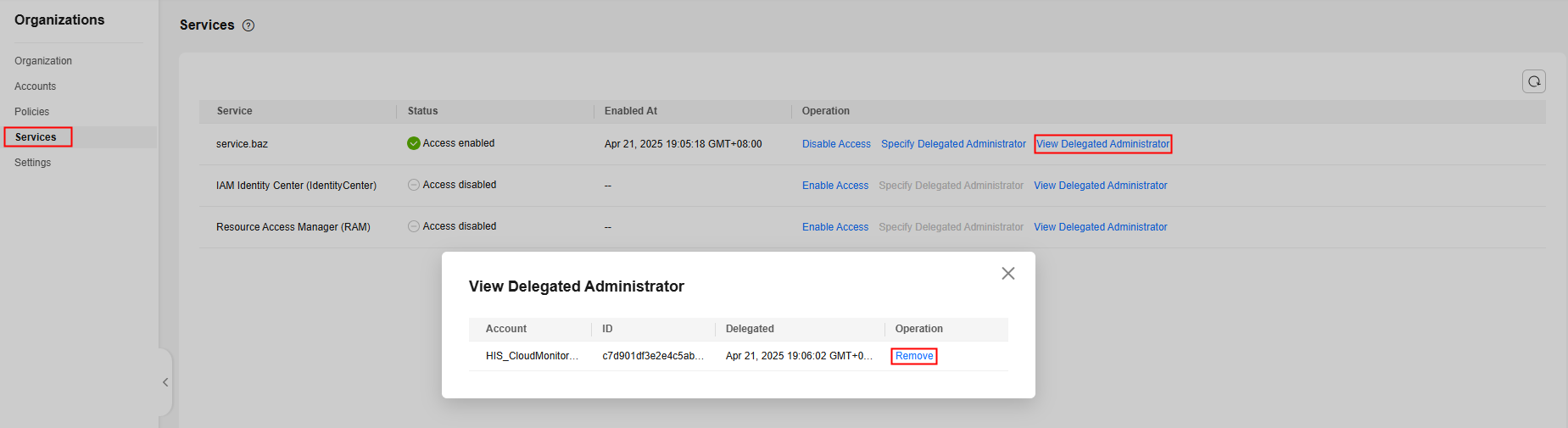
- Click OK in the displayed dialog box.
Parent topic: Managing Trusted Services
What is your overall rating for this page?
0
1
2
3
4
5
6
7
8
9
10
Very dissatisfiedVery satisfied
Thank you very much for your feedback. We will continue working to improve the documentation.
The system is busy. Please try again later.


