

Help Center/ MapReduce Service/ User Guide/ Configuring Storage-Compute Decoupling for an MRS Cluster/ Interconnecting an MRS Cluster with OBS Using an IAM Agency/ Example for Interconnecting an MRS Cluster with OBS/ Interconnecting Hudi with OBS Using an IAM Agency
Updated on 2025-12-10 GMT+08:00
Interconnecting Hudi with OBS Using an IAM Agency
After configuring decoupled storage and compute for a cluster by referring to Interconnecting an MRS Cluster with OBS Using an IAM Agency, you can create Hudi COW tables in spark-shell and store them to OBS.
Interconnecting Hudi with OBS
- Log in to the client installation node as the client installation user.
- Run the following commands to configure environment variables:
Load the environment variables.
source Client installation directory/bigdata_envLoad the component environment variables.
source Client installation directory/Hudi/component_env - Modify the configuration file:
vim Client installation directory/Hudi/hudi/conf/hdfs-site.xmlModify the following content, where the dfs.namenode.acls.enabled parameter specifies whether to enable the HDFS ACL function.
<property>
<name>dfs.namenode.acls.enabled</name>
<value>false</value>
</property>
- Authenticate the user of the cluster with Kerberos authentication enabled. Skip this step for the user of the cluster with Kerberos authentication disabled.
kinit Username - Start spark-shell and run the following commands to create a COW table and save it in OBS:
import org.apache.hudi.QuickstartUtils._
import scala.collection.JavaConversions._
import org.apache.spark.sql.SaveMode._
import org.apache.hudi.DataSourceReadOptions._
import org.apache.hudi.DataSourceWriteOptions._
import org.apache.hudi.config.HoodieWriteConfig._
val tableName = "hudi_cow_table"
val basePath = "obs://testhudi/cow_table/"
val dataGen = new DataGenerator
val inserts = convertToStringList(dataGen.generateInserts(10))
val df = spark.read.json(spark.sparkContext.parallelize(inserts, 2))
df.write.format("org.apache.hudi").
options(getQuickstartWriteConfigs).
option(PRECOMBINE_FIELD_OPT_KEY, "ts").
option(RECORDKEY_FIELD_OPT_KEY, "uuid").
option(PARTITIONPATH_FIELD_OPT_KEY, "partitionpath").
option(TABLE_NAME, tableName).
mode(Overwrite).
save(basePath);
In the preceding command, obs://testhudi/cow_table/ indicates the OBS path, and testhudi indicates the name of the parallel file system. Change them as required.
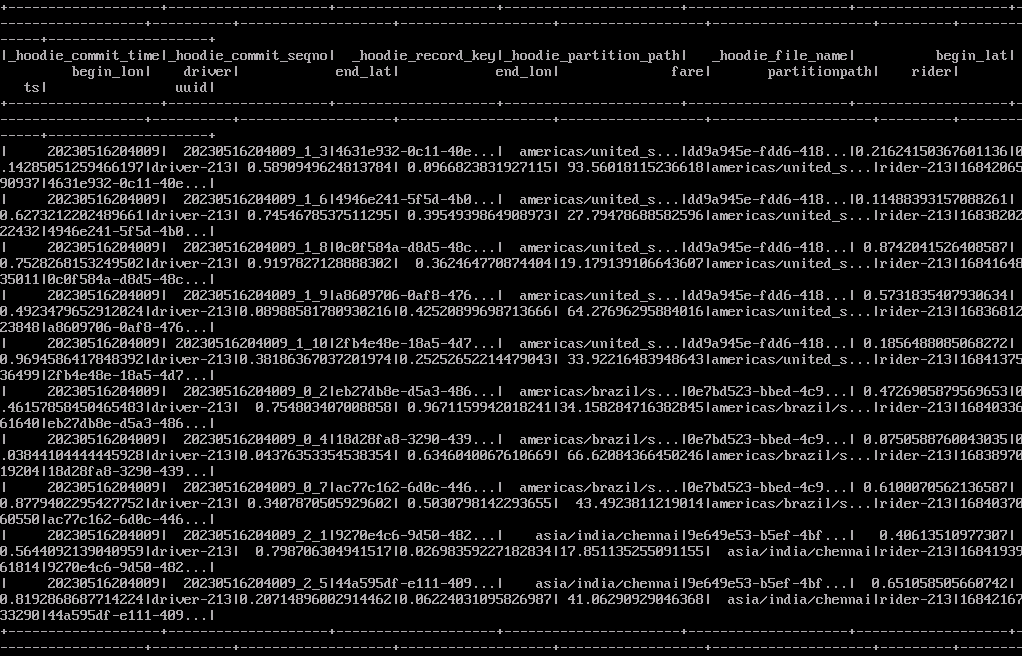
- Use DataSource to check whether the table is created and whether the data is normal.
val roViewDF = spark.
read.
format("org.apache.hudi").
load(basePath + "/*/*/*/*")
roViewDF.createOrReplaceTempView("hudi_ro_table")
spark.sql("select * from  hudi_ro_table").show()
Figure 1 Viewing table data
- Exit the spark-shell CLI.
:q
What is your overall rating for this page?
0
1
2
3
4
5
6
7
8
9
10
Very dissatisfiedVery satisfied
Thank you very much for your feedback. We will continue working to improve the documentation.
The system is busy. Please try again later.


