

Help Center/ IAM Identity Center/ User Guide/ MFA Management/ MFA Authentication/ Selecting an MFA Type
Updated on 2025-05-16 GMT+08:00
Selecting an MFA Type
You can select a device type for MFA authentication when IAM Identity Center users are prompted for MFA.
Procedure
- Log in to the Huawei Cloud management console.
- Click
 in the upper left corner of the page and choose Management & Governance > IAM Identity Center.
 - Choose Settings in the navigation pane.
- Click the Authentication tab.
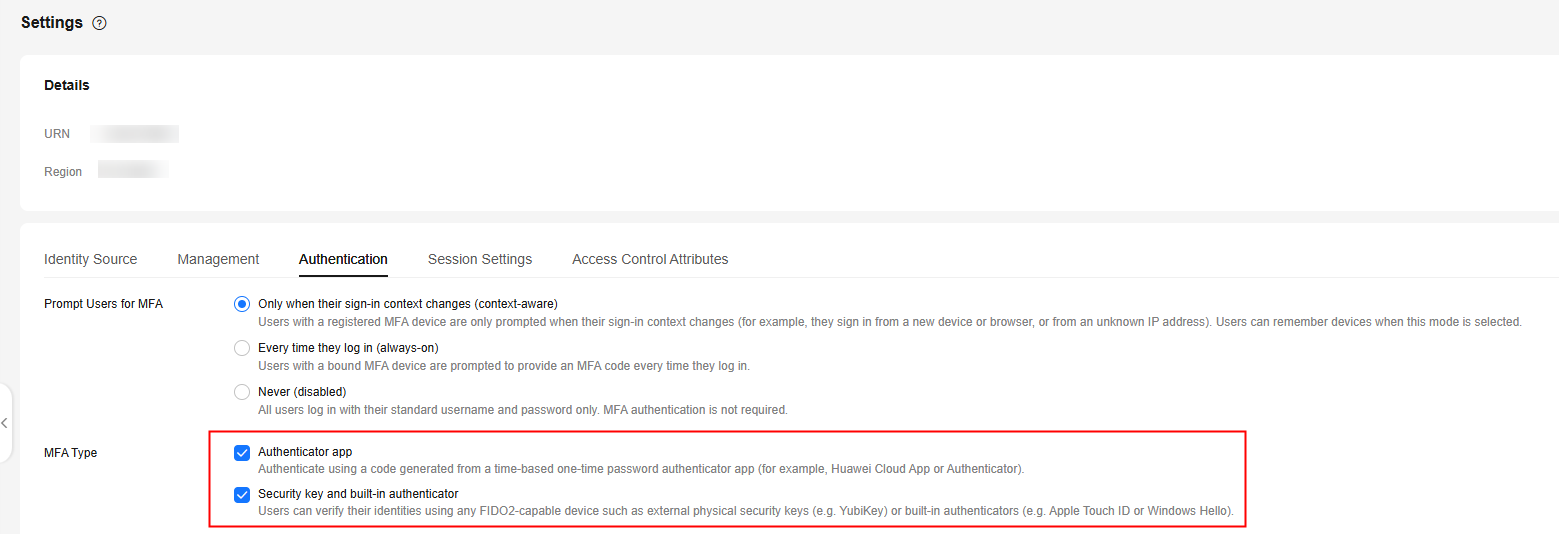
- In MFA Type, select one of the following MFA types based on service requirements. You can select two MFA types at the same time. For details, see Supported MFA Devices.
- Authenticator app
- Security key and built-in authenticator
Figure 1 Selecting an MFA type
- Click Save.
Parent topic: MFA Authentication
What is your overall rating for this page?
0
1
2
3
4
5
6
7
8
9
10
Very dissatisfiedVery satisfied
Thank you very much for your feedback. We will continue working to improve the documentation.
The system is busy. Please try again later.


