

Updated on 2025-05-16 GMT+08:00
IAM Identity Center Resetting
If you no longer need to use IAM Identity Center, intend to enable IAM Identity Center in a different region, or intend to create a new configuration from scratch, you can delete all data configured in IAM Identity Center.
IAM Identity Center is a project-level service. If you have enabled IAM Identity Center in a region and want to use it in another region, you need to delete the configuration in the original region before enabling IAM Identity Center in another region.
Procedure
- Log in to the Huawei Cloud management console.
- Click
 in the upper left corner of the page and choose Management & Governance > IAM Identity Center.
 - Choose Settings in the navigation pane.
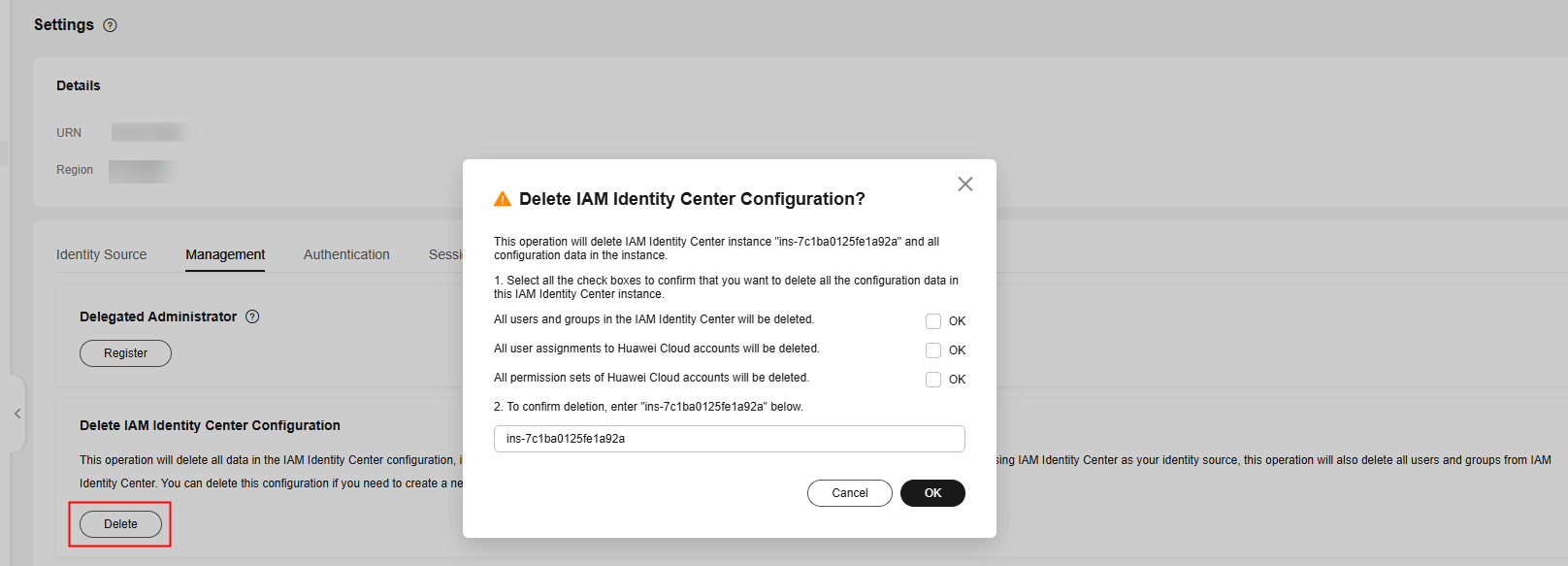
- On the Management tab, click Delete.
- In the displayed dialog box, select each checkbox to acknowledge the deletion, enter the IAM Identity Center instance ID in the text box, and click OK. Figure 1 Deleting the IAM Identity Center configuration

When the IAM Identity Center configuration is deleted, all the data in that configuration is deleted and cannot be recovered.
What is your overall rating for this page?
0
1
2
3
4
5
6
7
8
9
10
Very dissatisfiedVery satisfied
Thank you very much for your feedback. We will continue working to improve the documentation.
The system is busy. Please try again later.


