

Creating an HTTP Function
Overview
HTTP functions are designed to optimize web services and support multiple programming languages. You can send HTTP requests to URLs to trigger function execution.
Common Function Request Headers
The following table lists the default request header fields of an HTTP function.
| Field | Description |
|---|---|
| X-CFF-Request-Id | ID of the current request |
| X-CFF-Memory | Allocated memory |
| X-CFF-Timeout | Function timeout duration |
| X-CFF-Func-Version | Function version |
| X-CFF-Func-Name | Function name |
| X-CFF-Project-Id | Project ID |
| X-CFF-Package | App to which the function belongs |
| X-CFF-Region | Current region |
Constraints
- HTTP functions do not distinguish between programming languages. The handler must be set in the bootstrap file. You can directly write the startup command, and allow access over port 8000. The bound IP address is 127.0.0.1.
- The HTTP response body cannot exceed 6 MB.
A valid HTTP function response must contain body(String), statusCode(int), headers(Map), and isBase64Encoded(boolean). By default, the response is encoded using Base64. The default value of isBase64Encoded is true. The same applies to other frameworks.
- The bootstrap file is the startup file of the HTTP function. The HTTP function can only read bootstrap as the startup file name. If the file name is not bootstrap, the service cannot be started. For more information, see the bootstrap file example.
If you run the JAR package, you are advised to add the JVM parameter -Dfile.encoding=utf-8 to bootstrap. Otherwise, garbled Chinese characters may be displayed.
- Only APIG and APIC triggers can be created for HTTP functions. For details, see Using an APIG Trigger.
- HTTP functions cannot be executed for a long time, invoked asynchronously, or retried.
- When a function initiates an HTTP request, the request IP address is dynamic for private network access and fixed for public network access. For more information, contact technical support.
Creating and Configuring an HTTP Function
For details about how to build a FunctionGraph HTTP function using Go, see Building a FunctionGraph HTTP Function Using Go.
The following uses an example to describe how to create and configure an HTTP function.
Before calling an API, ensure that the network of your service system can communicate with the API access domain name or address.
- If the service system and the HTTP functions are in the same VPC, the API can be directly accessed.
- If the service system and the HTTP functions are in different VPCs of a region, connect them using a peering connection. For details, see .
- If the service system and the HTTP functions are in different VPCs of different regions, create a cloud connection and load the two VPCs to connect them.
- If the service system and the HTTP functions are connected over the public network, ensure that the HTTP function has been bound with an EIP.
Step 1: Creating a Code Package
- Prepare a Node.js script. A code example is as follows:
const http = require('http'); // Import Node.js core module var server = http.createServer(function (req, res) { //create web server res.writeHead(200, { 'Content-Type': 'text/html' }); res.write('<html><body><h2>This is http function.</h2></body></html>'); res.end(); }); server.listen(8000, '127.0.0.1'); //6 - listen for any incoming requests console.log('Node.js web server at port 8000 is running..') - You have prepared a bootstrap file as the startup file of the HTTP function.
The content of the bootstrap file is as follows:
/opt/function/runtime/nodejs12.13/rtsp/nodejs/bin/node $RUNTIME_CODE_ROOT/index.js
- Compress the preceding two files into a ZIP package. Figure 1 Compressing files into a ZIP package
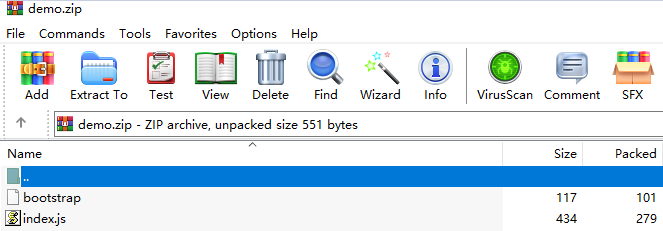
For HTTP functions in Python, add the -u parameter in the bootstrap file to ensure that logs can be flushed to the disk. For example:
/opt/function/runtime/python3.6/rtsp/python/bin/python3 -u $RUNTIME_CODE_ROOT/index.py
To use another runtime, change the runtime path by referring to Table 2. The code package path does not need to be changed.
Table 2 Paths for different runtimes Runtime
Path
Java 8
/opt/function/runtime/java8/rtsp/jre/bin/java
Java 11
/opt/function/runtime/java11/rtsp/jre/bin/java
Java 17
/opt/function/runtime/java17/rtsp/jre/bin/java
Java 21
/opt/function/runtime/java21/rtsp/jre/bin/java
Node.js 6
/opt/function/runtime/nodejs6.10/rtsp/nodejs/bin/node
Node.js 8
/opt/function/runtime/nodejs8.10/rtsp/nodejs/bin/node
Node.js 10
/opt/function/runtime/nodejs10.16/rtsp/nodejs/bin/node
Node.js 12
/opt/function/runtime/nodejs12.13/rtsp/nodejs/bin/node
Node.js 14
/opt/function/runtime/nodejs14.18/rtsp/nodejs/bin/node
Node.js 16
/opt/function/runtime/nodejs16.17/rtsp/nodejs/bin/node
Node.js 18
/opt/function/runtime/nodejs18.15/rtsp/nodejs/bin/node
Node.js 20
/opt/function/runtime/nodejs20.15/rtsp/nodejs/bin/node
Python 2.7
/opt/function/runtime/python2.7/rtsp/python/bin/python
Python 3.6
/opt/function/runtime/python3.6/rtsp/python/bin/python3
Python 3.9
/opt/function/runtime/python3.9/rtsp/python/bin/python3
Python 3.10
/opt/function/runtime/python3.10/rtsp/python/bin/python3
Python 3.12
/opt/function/runtime/python3.12/rtsp/python/bin/python3
PHP 7.3
/opt/function/runtime/php7.3/rtsp/php/bin/php
PHP 8.3
/opt/function/runtime/php8.3/rtsp/php/bin/php
C# (.NET Core 2.1)
/opt/function/runtime/dotnet2.1/rtsp/dotnet/dotnet
C# (.NET Core 3.1)
/opt/function/runtime/dotnet3.1/rtsp/dotnet/dotnet
C# (.NET Core 6.0)
/opt/function/runtime/dotnet6.0/rtsp/dotnet/dotnet
C# (.NET Core 8.0)
/opt/function/runtime/dotnet8.0/rtsp/dotnet/dotnet
Step 2: Deploying the Code Package
- On the Code page of the HTTP function, click Upload > Local ZIP, and upload the prepared ZIP file.
- Create a trigger.
- Choose Configuration > Triggers and click Create Trigger.
- Configure the trigger information. The following uses API Gateway (Dedicated) as an example. For details about the parameters, see Using an APIG (Dedicated) Trigger.
In this example, Security Authentication is set to None. You need to select an authentication mode based on site requirements.

- App: AppKey and AppSecret authentication. This mode is of high security and is recommended.
- IAM: IAM authentication. This mode grants access permissions to IAM users only and is of medium security.
- None: No authentication. This mode grants access permissions to all users.
- Click OK.
- Publish the API.
- On the Triggers tab page, click an API name to go to the API overview page.
- Click Modify in the upper right corner. The API basic information page is displayed.
- Change the value of Path to /user/get and click Finish.
- On the API details page, click Publish Latest Version in the upper right corner. On the displayed page, click OK.
Step 3: Triggering Function Execution
- Go to the FunctionGraph console, choose Functions > Function List in the navigation pane, and click the created HTTP function to go to its details page.
- Choose Configuration > Triggers, copy the URL as shown in , and access it using a browser.
- View the request result. Figure 2 Viewing the request result



