

Help Center/ FunctionGraph/ User Guide/ Managing Functions/ Replacing the Temporary AK/SK/ Using STS Token
Updated on 2026-01-13 GMT+08:00
Using STS Token
- Log in to the , choose Functions > Function List, and click a function name to go to the function details page. Figure 1 Viewing function details

- Click the Code tab and replace context.getAccessKey() and context.getSecretKey() in the original code with context.getSecurityAccessKey(), context.getSecuritySecretKey(), and context.getSecurityToken(). (Python is used as an example. For details about other languages, see Other Languages.) Figure 2 Modifying code
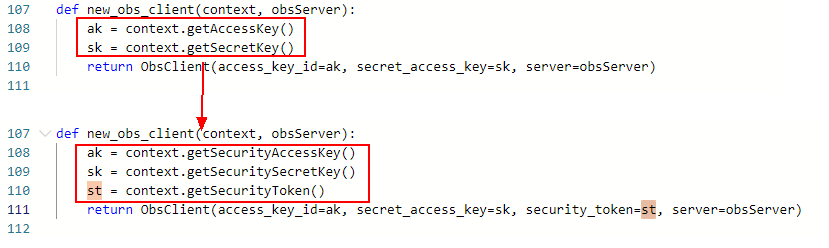

The STS token must contain the securityAccessKey, securitySecretKey, and securityToken parameters.
Parent topic: Replacing the Temporary AK/SK
What is your overall rating for this page?
0
1
2
3
4
5
6
7
8
9
10
Very dissatisfiedVery satisfied
Thank you very much for your feedback. We will continue working to improve the documentation.
The system is busy. Please try again later.


