

Help Center/ Domain Name Service/ User Guide/ Public DNS Resolution/ Public Zones/ Batch Creating Public Zones
Updated on 2026-04-09 GMT+08:00
Batch Creating Public Zones
Scenarios
If you want to host domain names registered with other DNS service providers on the DNS console, you can add them in batches.
Generally, if your domain name is registered with Huawei Cloud, the system automatically creates a zone for it after the registration is complete.
Constraints
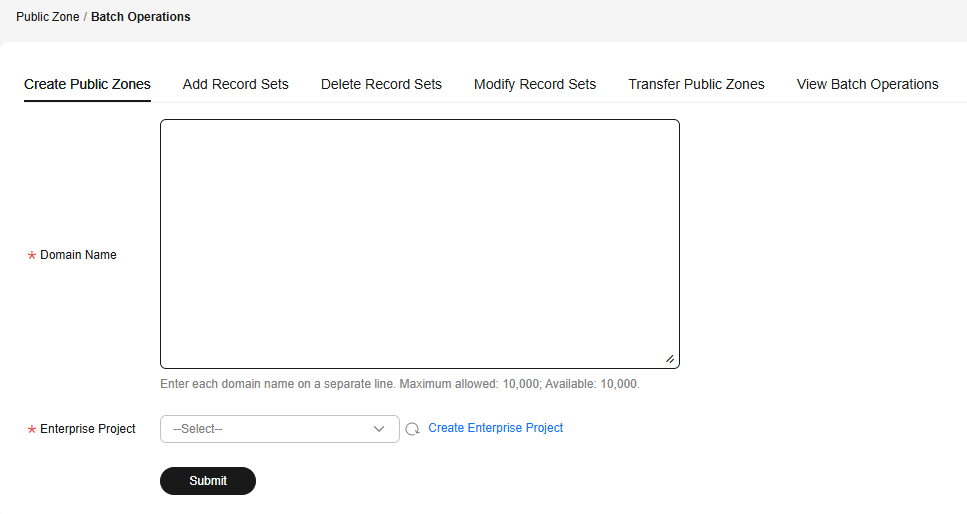
- You can enter up to 10,000 domain names at a time.
- Only domain names registered with third-party domain name registrars can be added.
- If a public zone has been created for the domain name by another Huawei Cloud account, you can reclaim the public zone by referring to Reclaiming a Public Zone.
Procedure
- Go to the Public Zones page.
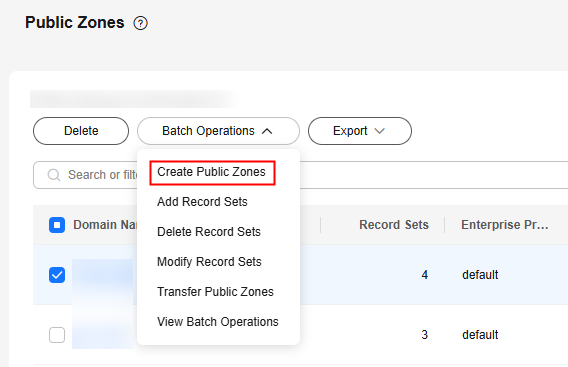
- In the Batch Operations area above the public zone list, select Create Public Zones from the drop-down list. Figure 1 Create Public Zones
- On the Create Public Zones tab, enter the domain names you want to add and select an enterprise project. Figure 2 Create Public Zones
- Click Submit.
After adding domain names, you can view the operation name, result, time, and status on the View Batch Operations tab. You can also download failed operations.
What is your overall rating for this page?
0
1
2
3
4
5
6
7
8
9
10
Very dissatisfiedVery satisfied
Thank you very much for your feedback. We will continue working to improve the documentation.
The system is busy. Please try again later.


