

Help Center/ Cloud Eye/ FAQs/ Troubleshooting/ Permissions Management/ What Can I Do If the System Displays a Message Indicating Insufficient Permissions When I Access Cloud Eye?
Updated on 2025-11-14 GMT+08:00
What Can I Do If the System Displays a Message Indicating Insufficient Permissions When I Access Cloud Eye?
This is because that you use an IAM user account, which does not have sufficient permissions. Check your permissions configured on IAM.
- Use the Huawei Cloud account to log in to the Huawei Cloud management console.
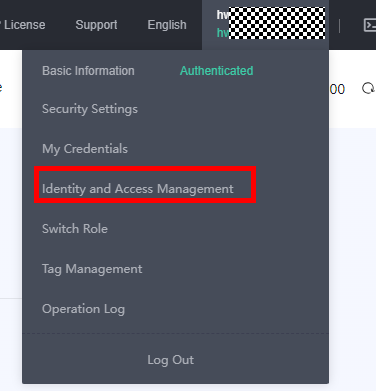
- On the management console, in the upper right corner, hover your mouse over the username, and choose Identity and Access Management from the drop-down list.
- In the navigation pane, choose User Groups.
- Expand details of the user group the user belongs to.
- Grant permissions to the user group that the IAM user belongs to. For details, see Creating a User Group and Assigning Permissions.

Cloud Eye provides a list of system policies, operations, and policy permissions. For details, see Permissions Management.
Parent topic: Permissions Management
What is your overall rating for this page?
0
1
2
3
4
5
6
7
8
9
10
Very dissatisfiedVery satisfied
Thank you very much for your feedback. We will continue working to improve the documentation.
The system is busy. Please try again later.


