

Help Center/ ModelArts/ FAQs/ Notebook (New Version)/ Others/ How Do I View GPU Usage on the Notebook?
Updated on 2025-09-08 GMT+08:00
How Do I View GPU Usage on the Notebook?
If you select GPU when creating a notebook instance, perform the following operations to view GPU usage:
- Log in to the ModelArts management console, and choose .
- In the Operation column of the target notebook instance in the notebook list, click Open to go to the Jupyter page.
- On the Files tab page of the Jupyter page, click New and select Terminal. The Terminal page is displayed.
- Run the following command to view GPU usage:
nvidia-smi
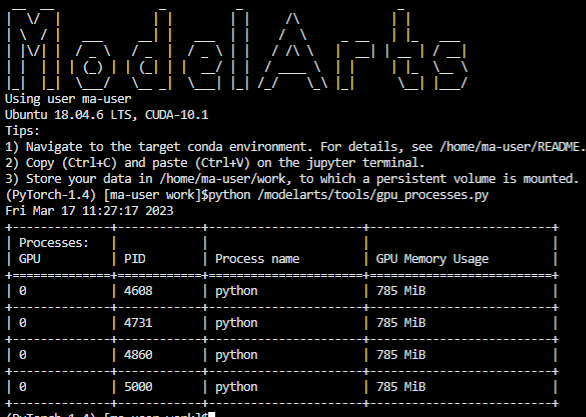
- Check which processes in the current notebook instance use GPUs.
python /modelarts/tools/gpu_processes.py
The following figure shows the case that the current process is using GPUs.
The following figure shows the case that the current process is not using GPUs.

Method 2:
Open /resource_info/gpu_usage.json and view the processes that are using GPUs.
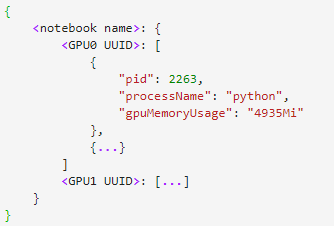
If no process is using GPUs, the file may be unavailable or empty.
Parent topic: Others
What is your overall rating for this page?
0
1
2
3
4
5
6
7
8
9
10
Very dissatisfiedVery satisfied
Thank you very much for your feedback. We will continue working to improve the documentation.
The system is busy. Please try again later.


