

Help Center/ DataArts Studio/ User Guide/ DataArts Security/ Unified Permission Governance/ Controlling Data Access Using Permissions/ Managing Members
Updated on 2026-02-13 GMT+08:00
Managing Members
DataArts Security allows you to view the permissions of workspace members, and manage roles and permission sets.
Prerequisites
- Permission sets or roles have been configured for members. For details, see Configuring Permission Sets or Configuring Roles.
Constraints
- Only the DAYU Administrator, Tenant Administrator, data security administrator, or role or permission set administrator can add or delete roles or permission sets for members.
- Only common roles can be added or deleted for members. Managed roles are not supported.
- The permissions configured for members take effect only after roles or permission sets are successfully synchronized.
Viewing the Policy and Details
- On the DataArts Studio console, locate a workspace and click DataArts Security.
- In the navigation pane on the left, choose . Figure 1 Member Management page

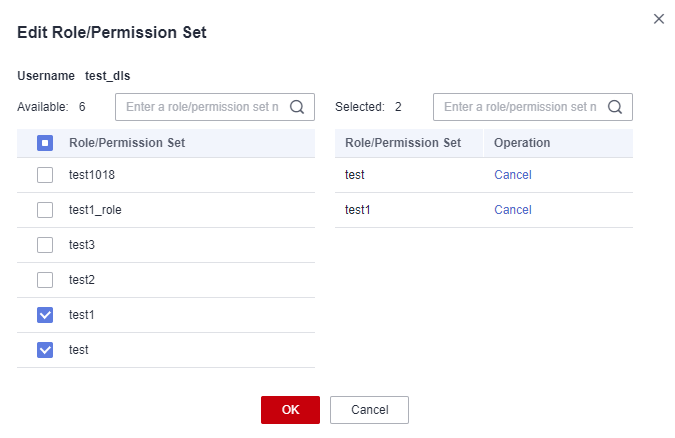
- Locate a member and click Edit in the Operation column. In the displayed dialog box, add or delete roles or permission sets for the member to manage its permissions. Figure 2 Edit Role/Permission Set
- Click View Permission in the Operation column to view the basic information, permissions, and permission sources of a member.
Parent topic: Controlling Data Access Using Permissions
What is your overall rating for this page?
0
1
2
3
4
5
6
7
8
9
10
Very dissatisfiedVery satisfied
Thank you very much for your feedback. We will continue working to improve the documentation.
The system is busy. Please try again later.


