

Creating a Rule
You can manage all rules that define relationships between metrics or between metrics and values. Rules are stored in directories.
Prerequisites
You have created a home directory. To create a home directory, log in to the DataArts Studio console, click Access under a specific instance, choose on the Workspaces tab page, choose from the left navigation bar on the page displayed, and create a directory. Before creating a rule for a metric, select a directory to store the rule. For details, see Figure 1.
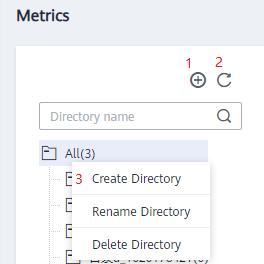
| No. | Description |
|---|---|
| 1 | Create Directory |
| 2 | Refresh Directory |
| 3 | Right-click All to create, rename, or delete a directory. |
Creating a Rule
- On the DataArts Studio console, locate a workspace and click DataArts Quality.
- Choose from the left navigation bar.
- Click Create. In the dialog box displayed, set the parameters based on Table 2.
Table 2 Rule parameters Parameter
Description
Rule Name
The name of a rule, which contains 1 to 64 characters and consists of only letters, numbers, and underscores (_).
Description
Information to better identify a rule. It cannot exceed 4096 characters.
Directory
The directory that stores the rule. You can select a created directory. Figure 1 shows the directory.
Define Relationship
A relationship is a logical expression between a metric and a value or between metrics. The relationship can contain arithmetic operations. Metrics are abbreviated to lowercase letters a to z and are added in the alphabetic order of metric abbreviations.
NOTE:Only one valid logical expression and the simple four arithmetic operations are supported.


