

Help Center/ DataArts Studio/ User Guide/ DataArts DataService/ Developing APIs in DataArts DataService/ Managing APIs/ Synchronizing APIs
Updated on 2025-08-05 GMT+08:00
Synchronizing APIs
Operation Scenario
You can synchronize APIs from DataArts DataService Exclusive to Data Map.
Prerequisites
An API has been created.
Synchronizing APIs to Data Map
- On the DataArts Studio console, locate a workspace and click DataArts DataService.
- In the left navigation pane, choose an edition, for example DataArts DataService Exclusive, to access the Overview page.
- Choose .
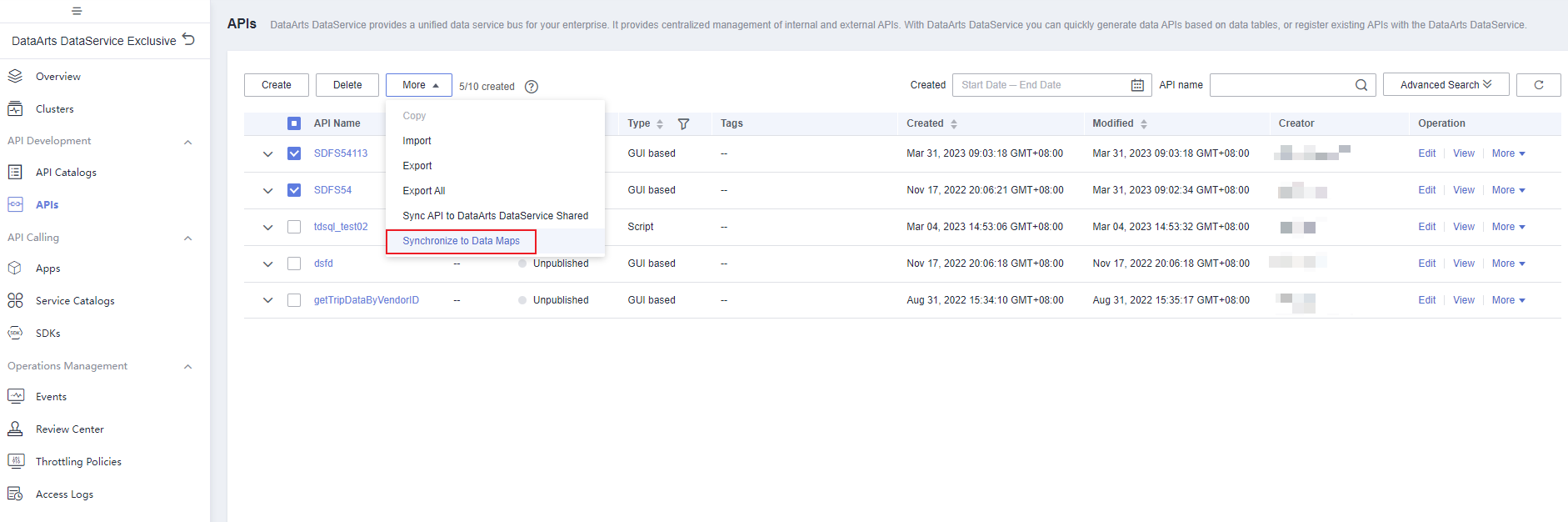
- Select the target APIs, click More above the API list, and select Synchronize to Data Maps. Figure 1 Synchronize to Data Maps
- On the Synch Result page, check the API synchronization status and details. Figure 2 Synchronization result


- Only published APIs can be synchronized to Data Map.
- Only APIs of the following data sources can be synchronized: DLI, DWS, HBase, and ClickHouse.
Parent topic: Managing APIs
What is your overall rating for this page?
0
1
2
3
4
5
6
7
8
9
10
Very dissatisfiedVery satisfied
Thank you very much for your feedback. We will continue working to improve the documentation.
The system is busy. Please try again later.


