

Help Center/ ModelArts/ FAQs/ Data Management (Old Version)/ What Do I Do If Images in a Dataset Cannot Be Displayed?
Updated on 2025-09-08 GMT+08:00
What Do I Do If Images in a Dataset Cannot Be Displayed?
Symptom
Images in a created dataset cannot be displayed during labeling, and they cannot be viewed by clicking them. Alternatively, the system displays a message indicating that an error occurred in image loading.
Possible Cause
- The local network may be faulty. As a result, OBS cannot be accessed and images cannot be loaded.
- You are not allowed to access the target OBS bucket.
- The OBS bucket or file may be encrypted.
- The OBS storage class does not allow the parallel file system to process images. Therefore, the thumbnails cannot be displayed.
Solution
- The following uses Google Chrome as an example. Press F12 to open the browser console, locate the image, and copy the image URL. Figure 1 Obtaining the image URL
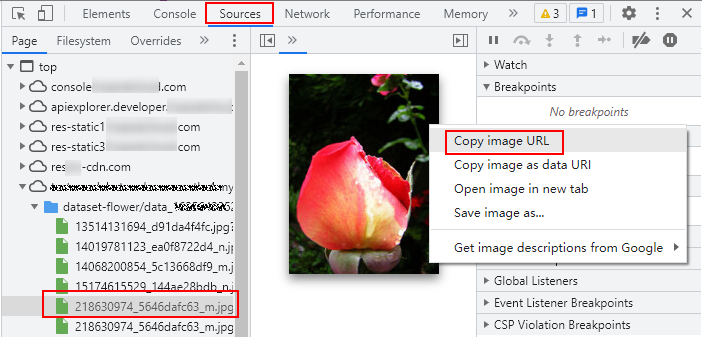
- Enter the URL in a new browser. The "Your Connection Is Not Private" message is displayed. Click Advanced on the page and choose Proceed to <link> (unsafe) to go to the target website.
- After the image is successfully accessed, return to the ModelArts console to access the dataset. The image is displayed.
Parent topic: Data Management (Old Version)
What is your overall rating for this page?
0
1
2
3
4
5
6
7
8
9
10
Very dissatisfiedVery satisfied
Thank you very much for your feedback. We will continue working to improve the documentation.
The system is busy. Please try again later.


