

Help Center/ CodeArts Build/ FAQs/ npm Builds/ Why Am I Seeing the Error Message "error: Could Not Write Config File"?
Updated on 2024-11-18 GMT+08:00
Why Am I Seeing the Error Message "error: Could Not Write Config File"?
Symptoms
When an npm build task is executed, the following error information is reported in the log: error: could not write config file /npmcache/_cacache/tmp/git-clone-b0ba91a1/.git/config: Disk quota exceeded
Cause Analysis
The npm cache space is insufficient and needs to be cleared.
Solution
- Log in to CodeArts Build.
- Select the corresponding build task, click
 in the row of the task, and click Edit.
 - On the Build Actions page, modify the Build with npm action.
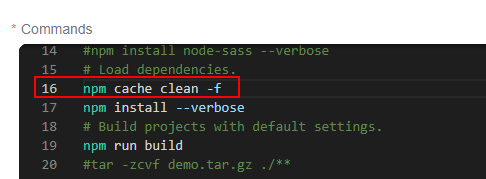
- Add the npm cache clean -f command before the npm install command, save the task, and execute the task again.
Parent topic: npm Builds
What is your overall rating for this page?
0
1
2
3
4
5
6
7
8
9
10
Very dissatisfiedVery satisfied
Thank you very much for your feedback. We will continue working to improve the documentation.
The system is busy. Please try again later.


