

Help Center/ Object Storage Service/ Best Practices/ Using a User-Defined Domain Name to Host a Static Website/ Procedure/ Configuring a User-Defined Domain Name
Updated on 2025-09-28 GMT+08:00
Configuring a User-Defined Domain Name
- Click the bucket name to go to the Objects page. In the navigation pane, choose Domain Name Mgmt.
- Click Configure User Domain Name in the upper part of the page, or in the lower card area of the page (when no user-defined domain names are available). On the displayed page, enter www.example.com, as shown in Figure 1.
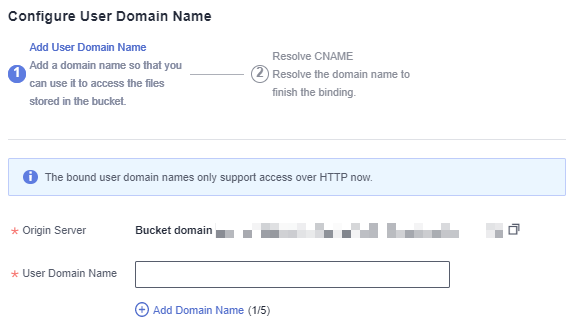
- Click OK.
- Based on the tips, click Resolve or manually add a CNAME record set. Then, click OK.

Clicking Resolve will automatically add CNAME record sets for Huawei Cloud domain names. To resolve those domain names not registered with Huawei Cloud, you need to configure resolution rules by yourself.
Parent topic: Procedure
What is your overall rating for this page?
0
1
2
3
4
5
6
7
8
9
10
Very dissatisfiedVery satisfied
Thank you very much for your feedback. We will continue working to improve the documentation.
The system is busy. Please try again later.


