

HBase Application Development Process
This section describes how to call open source APIs of HBase in the CloudTable cluster mode to develop Java applications.
Figure 1 and Table 1 describe the phases in the development process.
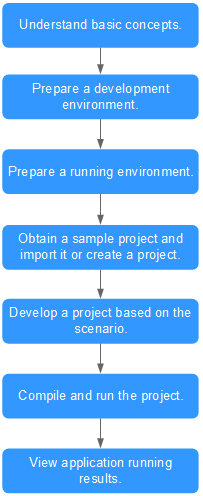
| Phase | Description | Reference |
|---|---|---|
| Understand basic concepts. | Before application development, learn basic concepts of HBase, understand the scenario requirements, and design tables. | |
| Prepare a development environment. | The Java language is recommended for HBase application development. You can use the Eclipse tool. | |
| Prepare a running environment. | The application running environment is a client. Install and configure the client according to the guide. | |
| Prepare a project. | CloudTable provides example projects for different scenarios. You can import an example project to learn the application. You can also create a project according to the guide. | |
| Develop a project based on the scenario. | An example project using Java is provided, including creating a table, writing data into the table, and deleting the table. | |
| Compile and run the application. | You can compile the developed application and submit it for running. | Compiling and Running Applications Compiling and Running an Application When a Client Is Installed or Compiling and Running an Application When No Client Is Installed |
| View application running results. | Application running results are exported to a path you specify. You can also view the application running status on the UI. |
|


