

Help Center/ Log Tank Service/ User Guide/ Log Ingestion/ Using ICAgent to Collect Container Logs/ Overview
Updated on 2025-11-17 GMT+08:00
Overview
LTS uses ICAgent to collect logs from Cloud Container Engine (CCE) applications, self-built Kubernetes (K8s) applications, and ServiceStage containerized applications.
Figure 1 ICAgent workflow
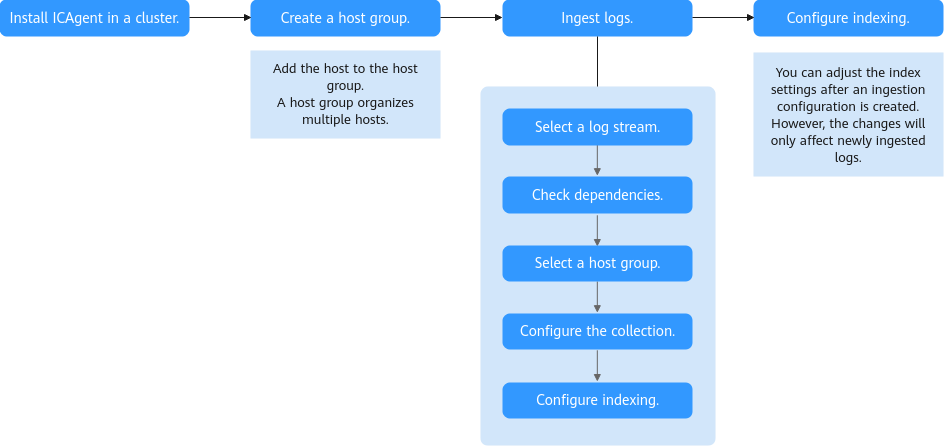
- Install ICAgent in a cluster. Choose an appropriate method based on your cluster type:
- Create a host group. Add the host with ICAgent installed to the host group. For details, see Managing Host Groups.
- Ingest logs. LTS delivers collection configurations to ICAgent by host group, enabling ICAgent to report logs from multiple hosts to LTS based on these configurations.
- Configure indexing. After logs are ingested, configure full-text or field indexing on the index configuration page. This enables searching and analyzing the collected log data.
Parent topic: Using ICAgent to Collect Container Logs
What is your overall rating for this page?
0
1
2
3
4
5
6
7
8
9
10
Very dissatisfiedVery satisfied
Thank you very much for your feedback. We will continue working to improve the documentation.
The system is busy. Please try again later.


