

Help Center/ Host Security Service/ User Guide/ Container Protection/ Container Cluster Protection/ Checking Container Cluster Protection Events
Updated on 2025-10-21 GMT+08:00
Checking Container Cluster Protection Events
HSS detects risks and displays security events in the protection event list. This section describes how to check the events.
Checking Container Cluster Protection Events
- Log in to the HSS console.Log in to the management console.
- Click
 in the upper left corner and select a region or project.
- In the navigation pane, choose .
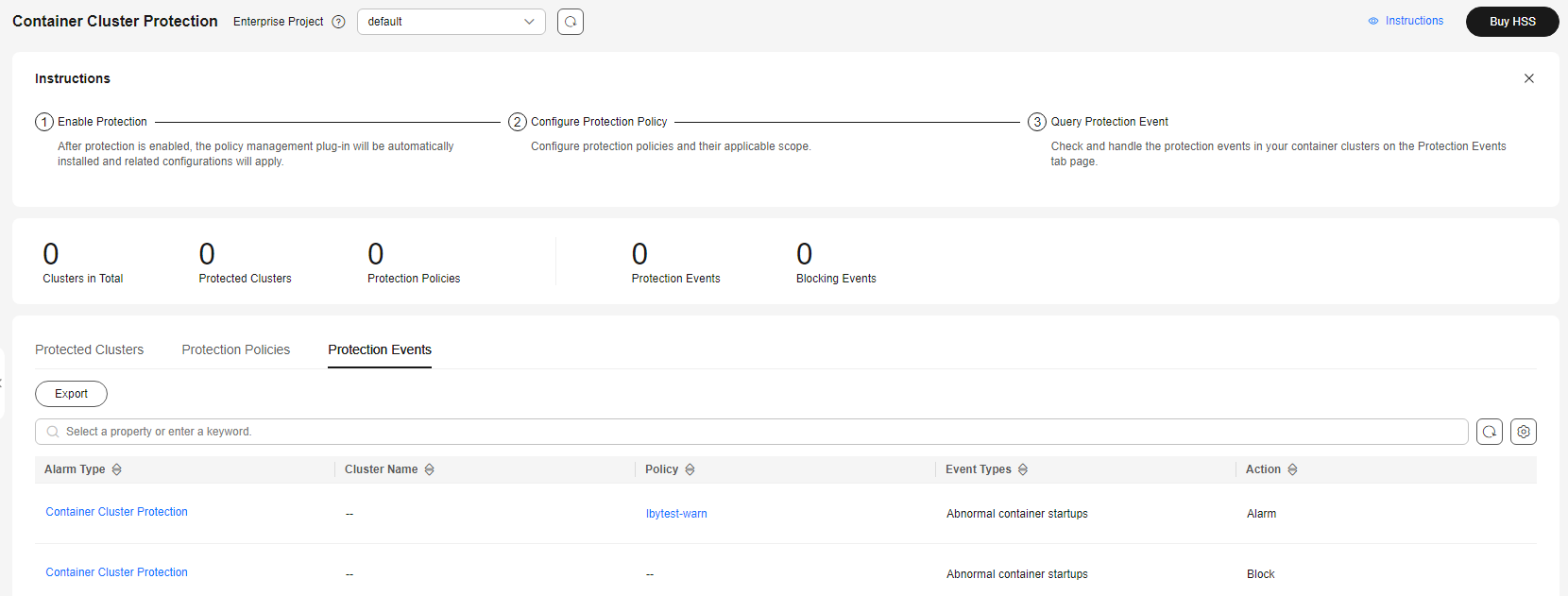
- Click the Protection Events tab and check events in the cluster.
To export events to your local PC, click Export in the upper left corner of the event list.
Figure 1 Viewing protection events
- Click an alarm name to view affected resources.
What is your overall rating for this page?
0
1
2
3
4
5
6
7
8
9
10
Very dissatisfiedVery satisfied
Thank you very much for your feedback. We will continue working to improve the documentation.
The system is busy. Please try again later.


