

Listener Overview
A listener checks requests from clients and routes requests to backend servers using the protocol, port, and load balancing algorithm you select. You need to add at least one listener to a load balancer.
Supported Protocols and Application Scenarios
ELB provides load balancing at both Layer 4 and Layer 7. You can select a protocol that meets your requirements based on Table 1.
For a network load balancer at Layer 4, you can add TCP or UDP listeners.
For an application load balancer at Layer 7, you can add HTTP or HTTPS listeners.
| Type | Protocol | Description | Application Scenario |
|---|---|---|---|
| Network listeners | TCP |
|
|
| Network listeners | UDP |
| Scenarios that require quick response, such as video chat, gaming, and real-time financial news |
| Application listeners | HTTP |
| Applications that require content identification, for example, web applications and mobile games |
| Application listeners | HTTPS |
| Workloads that require encrypted transmission, such as e-commerce and financial services |
Frontend Protocols and Ports
Frontend protocols and ports are used by load balancers to receive requests from clients.
Load balancers use TCP or UDP for network load balancing, and HTTP or HTTPS for application load balancing. Select protocols and ports that best suit your requirements.

The frontend protocols and ports cannot be changed once listeners are added. If you want to use different protocols and ports, add new listeners.
| Frontend Protocol | TCP, UDP, HTTP, and HTTPS |
|---|---|
| Frontend Port | Listeners using different protocols of a load balancer cannot use the same port. However, UDP listeners can use the same port as those using other protocols. For example, if there is a TCP listener that uses port 88, you can add a UDP listener that also uses port 88. The port ranges from 1 to 65535. Common ports: TCP/80 and HTTPS/443 |
Backend Protocols and Ports
Backend protocols and ports are used by backend servers to receive requests from load balancers. If Windows servers have Internet Information Services (IIS) installed, the default backend protocol and port are HTTP and 80.
| Backend Protocol | TCP, UDP, HTTP, HTTPS, QUIC, gRPC |
|---|---|
| Backend Port | Backend servers of a load balancer can use the same port. The port ranges from 1 to 65535. Common ports: TCP/80, HTTP/80, and HTTPS/443 |
Forwarding Traffic by Port Ranges
TCP and UDP listeners can route traffic by port ranges.
This function allows a TCP or UDP listener to check requests from all ports in the port ranges you specify and route the requests to the backend servers over the corresponding ports.
Timeout Durations
You can configure and modify timeout durations for your listeners to meet varied demands. For example, if the size of a request from an HTTP or HTTPS client is large, you can prolong the request timeout duration to ensure that the request can be successfully routed.
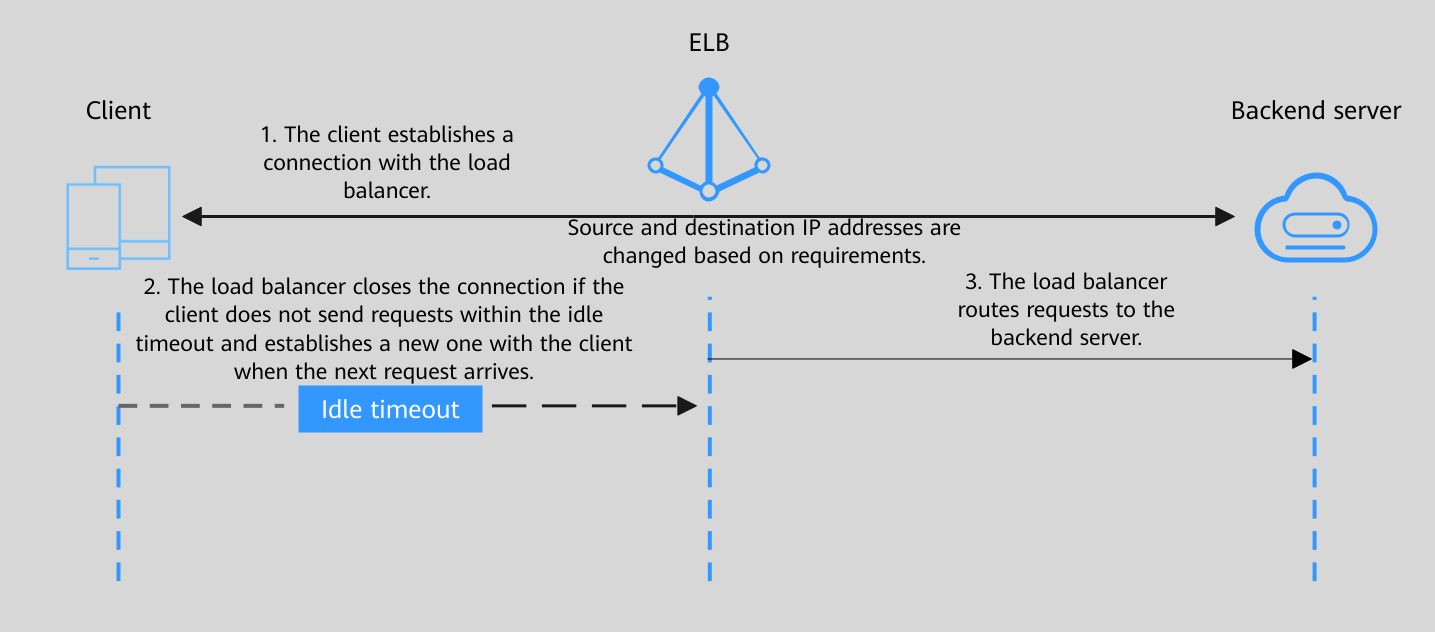
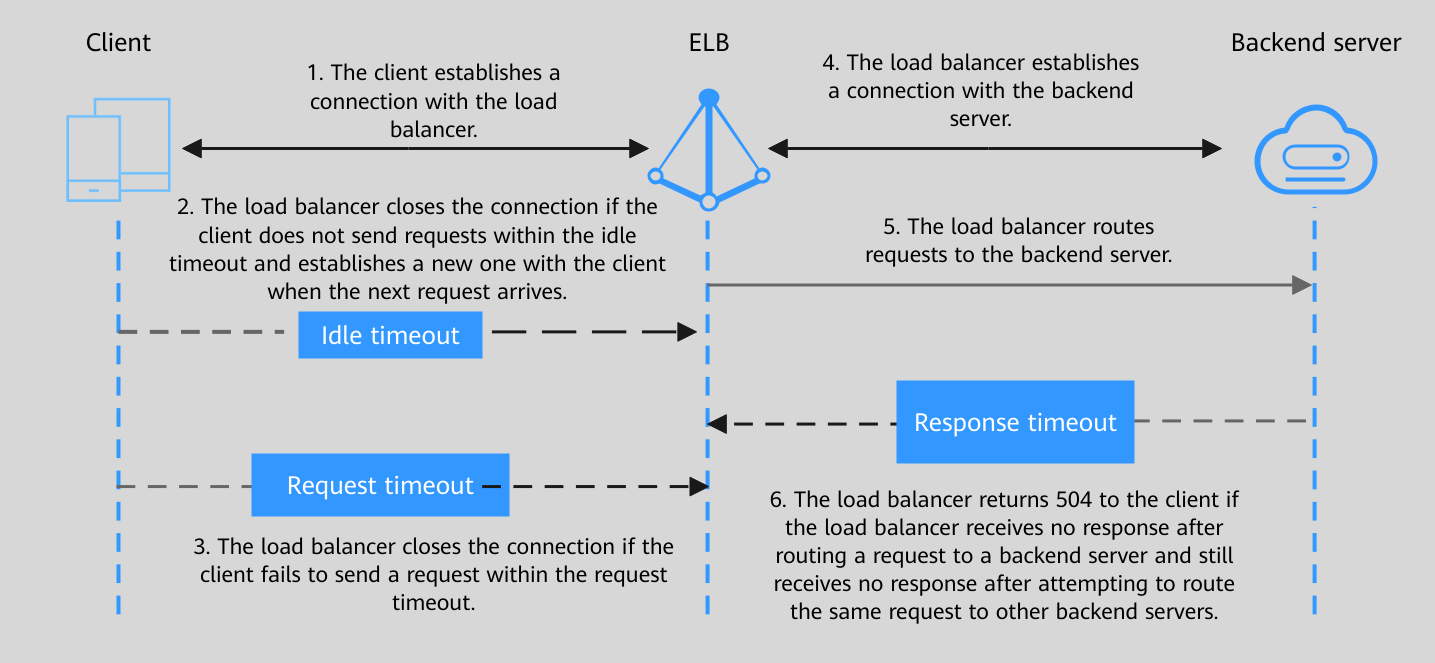
| Protocol | Type | Description | Value Range | Default Timeout Duration |
|---|---|---|---|---|
| Idle Timeout | Specifies the length of time for a connection to keep alive, in seconds. If no request is received within this period, the load balancer closes the connection and establishes a new one with the client when the next request arrives. | 10–4000s | 300s |
| Protocol | Type | Description | Value Range | Default Timeout Duration |
|---|---|---|---|---|
| Idle Timeout | Specifies the length of time for a connection to keep alive, in seconds. If no request is received within this period, the load balancer closes the connection and establishes a new one with the client when the next request arrives. | 0–4000s | 60s |
| Request Timeout | Specifies the length of time (in seconds) that a load balancer is willing to wait for a client request to finish. The load balancer terminates the connection if a request takes too long to complete. | 1–300s | 60s | |
| Response Timeout | Specifies the length of time (in seconds) after which the load balancer sends a 504 Gateway Timeout error to the client if the load balancer receives no response from the backend server after routing a request to the backend server and receives no response after attempting to route the same request to other backend servers. If sticky session is enabled and the load balancer receives no response from the backend server within the response timeout duration, the load balancer returns a 504 Gateway Timeout error to the client directly. | 1–300s | 60s |


