

Help Center/ DataArts Studio/ User Guide/ Buying and Configuring a DataArts Studio Instance/ Creating and Configuring a Workspace in Simple Mode/ (Optional) Changing the Job Log Storage Path
Updated on 2025-11-26 GMT+08:00
(Optional) Changing the Job Log Storage Path
By default, job logs and DLI dirty data are stored in an OBS bucket named dlf-log-{project ID}. You can customize a storage path for logs and one for DLI dirty data. You can also configure an OBS bucket globally based on the workspace.
Notes and Constraints
- This function depends on the OBS service.
- The OBS path is only supported for OBS buckets and not for parallel file systems.
Prerequisites
You are using either of the following accounts:
- DAYU Administrator or Tenant Administrator
- DAYU User, which is the administrator of the current workspace
Procedure
- Log in to the DataArts Studio console by following the instructions in Accessing the DataArts St.
- On the Workspaces page, locate the target workspace and click Edit in the Operation column. Figure 1 Workspace Information dialog box
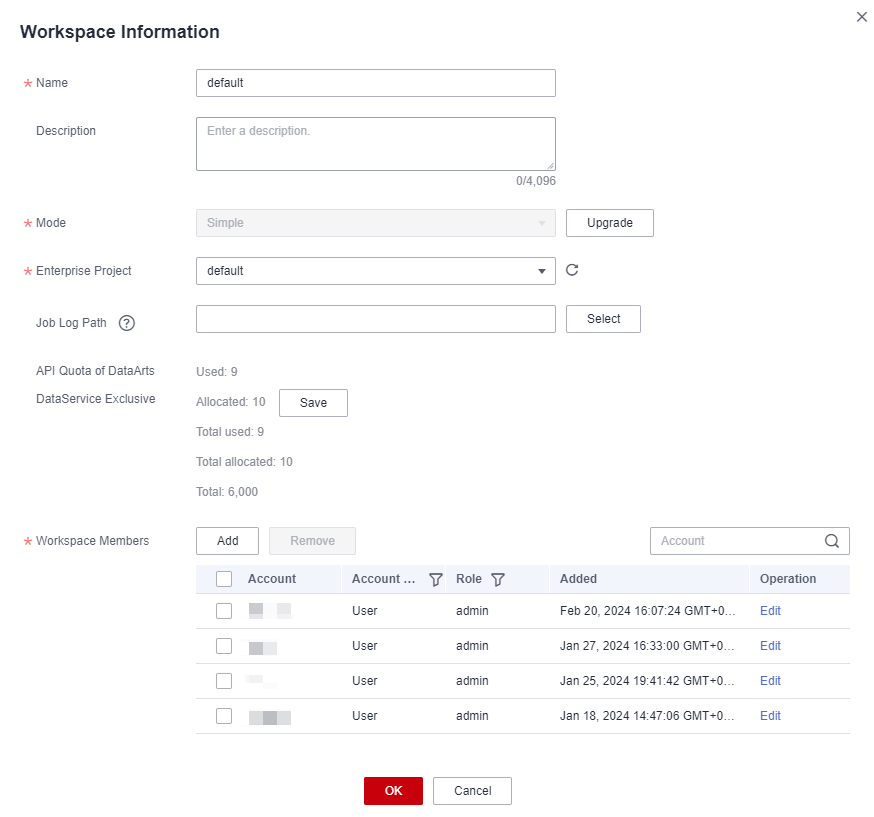
- In the Workspace Information dialog box, click Select next to Job Log Path and Dirty Data Path and select a path. Figure 2 Changing the job log path and DLI dirty data path

- Click OK.
Parent topic: Creating and Configuring a Workspace in Simple Mode
What is your overall rating for this page?
0
1
2
3
4
5
6
7
8
9
10
Very dissatisfiedVery satisfied
Thank you very much for your feedback. We will continue working to improve the documentation.
The system is busy. Please try again later.


