

Downloading and Installing the SDK (SDK for C)
This section provides the download and compilation methods for the OBS SDK for C.
SDK Download
- Latest version of OBS C SDK source code: Click here to download.
SDK Compilation
You can compile the SDK based on the platform you are using. Before that, you must obtain the SDK source code.
- In Linux:
Go to the source/eSDK_OBS_API/eSDK_OBS_API_C++/ directory and run the following script:
export SPDLOG_VERSION=spdlog-1.12.0
#On an x86 server, run the following command:
bash build.sh sdk
#On an Arm server, run the following command:
bash build_aarch.sh sdk
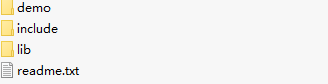
For details about the parameters, see the comments in the scripts. A sdk.tgz demo package that contains the content shown below is generated.
- In Windows:
Use Visual Studio to open the sln file in source/eSDK_OBS_API/eSDK_OBS_API_C++/sln/vc100/ and generate the obs project. Then, huaweisecurec.lib, huaweisecurec.dll, libeSDKOBS.lib, and libeSDKOBS.dll are generated in the output directory (which can be queried in the project properties).


