

Help Center/ ModelArts/ FAQs/ Notebook (New Version)/ Using Custom Images in Notebook/ How Do I Use the Image Customized by a User Under a Different Master Account to Create a Notebook Instance?
Updated on 2025-09-08 GMT+08:00
How Do I Use the Image Customized by a User Under a Different Master Account to Create a Notebook Instance?
Two users belong to different master accounts. If user A needs to use user B's custom image to create a notebook instance, user B needs to share the image with user A. Then user A pulls the shared image and registers it before using it in the notebook instance. The procedure is as follows:
Operations performed by user B:
- Log in to the SWR console and choose My Images.
- Click the name of the image to be shared to access its details page.
- On the Sharing tab, click Share Image. In the displayed dialog box, set required parameters such as the account and click OK.
Operations performed by user A:
- Log in to the SWR console, choose My Images > Shared Images, view the image shared by user B, and click the image name to go to its details page.
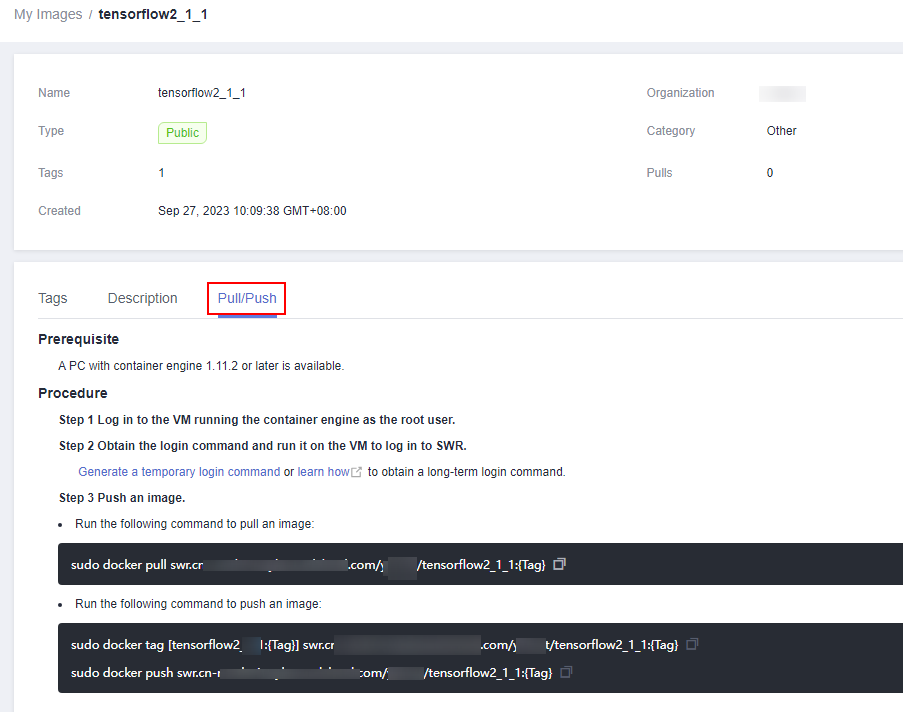
- Pull the image shared by user B as your own image by following the instructions provided on the Pull/Push tab.
- Log in to the ModelArts console, select the pulled image and register it. After the registration is successful, you can use the image on the Notebook page.
Parent topic: Using Custom Images in Notebook
What is your overall rating for this page?
0
1
2
3
4
5
6
7
8
9
10
Very dissatisfiedVery satisfied
Thank you very much for your feedback. We will continue working to improve the documentation.
The system is busy. Please try again later.


