

Help Center/ ModelArts/ FAQs/ Notebook (New Version)/ Code Execution/ What Do I Do If Files Fail to Be Saved in JupyterLab?
Updated on 2025-09-08 GMT+08:00
What Do I Do If Files Fail to Be Saved in JupyterLab?
Symptom
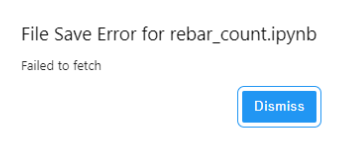
When a file is saved in JupyterLab, an error message is displayed.
Possible Cause
- A third-party plug-in has been installed on the browser, and the proxy intercepts the request. As a result, the file cannot be saved.
- The runtime file in the notebook is too large.
- You have stayed on the Jupyter page for too long.
- There is a network error. Check whether a network proxy is connected.
Solution
- Disable the plug-in and save the file again.
- Reduce the file size.
- Open the Jupyter page again.
- Check the network.
Parent topic: Code Execution
What is your overall rating for this page?
0
1
2
3
4
5
6
7
8
9
10
Very dissatisfiedVery satisfied
Thank you very much for your feedback. We will continue working to improve the documentation.
The system is busy. Please try again later.


