

Help Center/ ModelArts/ FAQs/ Notebook (New Version)/ Failures to Access the Development Environment Through VS Code/ What Do I Do If Error Message "Load key "C:/Users/xx/test1/xxx.pem": invalid format" Is Displayed?
Updated on 2025-09-08 GMT+08:00
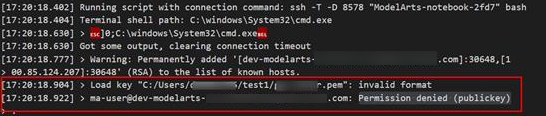
What Do I Do If Error Message "Load key "C:/Users/xx/test1/xxx.pem": invalid format" Is Displayed?
Symptom
Possible Cause
The content or format of the key file is incorrect.
Solution
Use the correct key file for remote access. If there is no correct key file locally or the file is damaged, perform the following operations:
- Log in to the console, search for DEW. On the DEW console, choose Key Pair Service and click Account Key Pairs. Then, view and download the correct key file.
- If the key cannot be downloaded and the originally downloaded key was lost, create a new development environment instance and a new key file.
What is your overall rating for this page?
0
1
2
3
4
5
6
7
8
9
10
Very dissatisfiedVery satisfied
Thank you very much for your feedback. We will continue working to improve the documentation.
The system is busy. Please try again later.


