

Help Center/ Partner Center/ Developer Guide/ (Optional) Customizing HUAWEI CLOUD Management Console/ Customizing Logo Display
Updated on 2022-12-29 GMT+08:00
Customizing Logo Display
You can upload your enterprise logo and set the HUAWEI CLOUD console to display both the Huawei and your logos.
- On the Customize Console page, click the Brand tab.
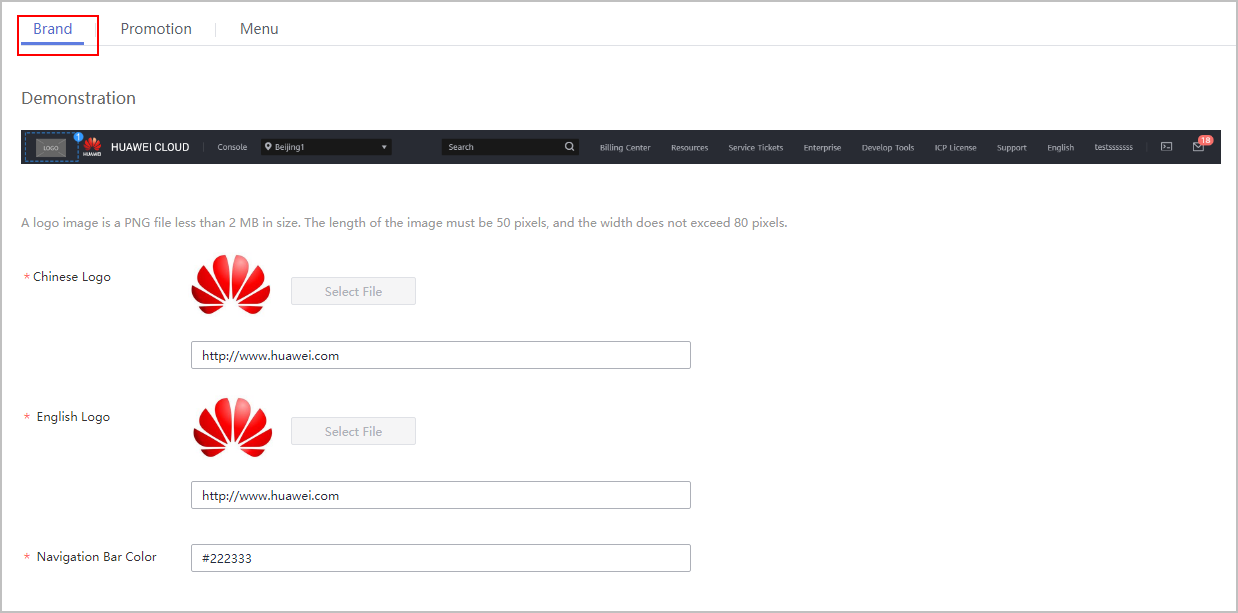
- Click Select File and upload your Chinese and English logos. If they are the same, you can upload the same picture. Then, click Submit.
- Configure the redirection URL for each logo.
- Enter the RGB color code in the Navigation Bar Color text box.
Parent topic: (Optional) Customizing HUAWEI CLOUD Management Console
What is your overall rating for this page?
0
1
2
3
4
5
6
7
8
9
10
Very dissatisfiedVery satisfied
Thank you very much for your feedback. We will continue working to improve the documentation.
The system is busy. Please try again later.


