

Help Center/ Cloud Search Service/ FAQs/ Managing CSS Clusters/ How Do I Obtain the Security Certificate of a CSS Security-Mode Cluster?
Updated on 2026-10-29 GMT+08:00
How Do I Obtain the Security Certificate of a CSS Security-Mode Cluster?
The security certificate (CloudSearchService.cer) can be downloaded only for security-mode clusters that have enabled HTTPS access.

When using certificate-based authentication in a public network environment, disable hostname verification. Otherwise, certificate verification will fail.
- Obtain the security certificate of an Elasticsearch cluster.
- Log in to the CSS management console.
- In the navigation pane on the left, choose Clusters > Elasticsearch.
- In the cluster list, click the name of the target cluster. The cluster information page is displayed.
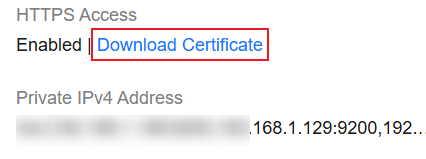
- Click the Overview tab. In the Network Information area, click Download Certificate below HTTPS Access. Figure 1 Downloading a security certificate

- Obtain the security certificate of an OpenSearch cluster.
- Log in to the CSS management console.
- In the navigation pane on the left, choose Clusters > OpenSearch.
- In the cluster list, click the name of the target cluster. The cluster information page is displayed.
- Click the Overview tab. In the Network Information area, click Download Certificate below HTTPS Access. Figure 2 Downloading a security certificate
Parent topic: Managing CSS Clusters
What is your overall rating for this page?
0
1
2
3
4
5
6
7
8
9
10
Very dissatisfiedVery satisfied
Thank you very much for your feedback. We will continue working to improve the documentation.
The system is busy. Please try again later.


