

Help Center/ Cloud Search Service/ FAQs/ Migrating CSS Clusters/ Can I Export Data Using OpenSearch Dashboards in CSS?
Updated on 2026-10-29 GMT+08:00
Can I Export Data Using OpenSearch Dashboards in CSS?
Only OpenSearch 2.19.0 and 3.4.0 clusters allow you to export charts and tables through OpenSearch Dashboards.

- A maximum of 10 MB of data can be exported. If the data you want to export exceeds 10 MB, only the first 10 MB is exported.
- Any special characters such as =+-@ in exported CSV files may be identified as part of some formulas, leading to data export failures.
- Exporting a dashboard
- Log in to the OpenSearch Dashboards.
- Choose OpenSearch Dashboards > Dashboards. The Dashboards page is displayed.
- Find the dashboard you want to export and click its title. The details page is displayed.
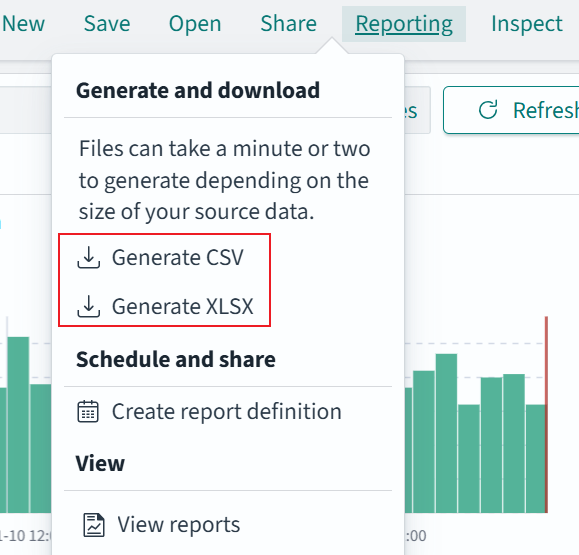
- Click Reporting in the upper right corner, and select a download format. Once the report is generated, select a save location on your local PC to download it.
Save the dashboard before exporting it, or an error will be returned.
Figure 1 Selecting an export file format

- Exporting data
- Log in to the OpenSearch Dashboards.
- Choose OpenSearch Dashboards > Discover. The Discover page is displayed.
- Click Save in the upper right corner to save search data, then click Reporting. Select a download format, and once the report is generated, select a save location on your local PC to download it. Figure 2 Selecting an export file format
Parent topic: Migrating CSS Clusters
What is your overall rating for this page?
0
1
2
3
4
5
6
7
8
9
10
Very dissatisfiedVery satisfied
Thank you very much for your feedback. We will continue working to improve the documentation.
The system is busy. Please try again later.


