

Help Center/ Bare Metal Server/ Private Image Creation Guide/ Linux/ Checking the Cloud-Init Status/ SUSE 11 SP4
Updated on 2022-09-09 GMT+08:00
SUSE 11 SP4
- Run the yast command and select System.
- Press Tab and select Sytem Services (Runlevel).
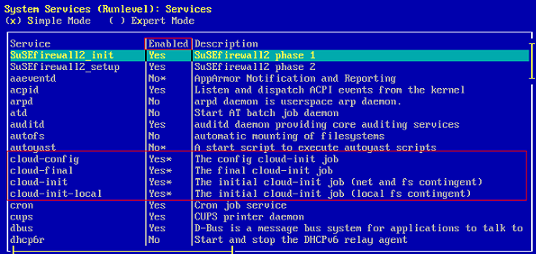
- Press Enter. The following figure indicates that automatic startup has been enabled for the four services of Cloud-Init. If it is not enabled for a service, enable it.
Parent topic: Checking the Cloud-Init Status
What is your overall rating for this page?
0
1
2
3
4
5
6
7
8
9
10
Very dissatisfiedVery satisfied
Thank you very much for your feedback. We will continue working to improve the documentation.
The system is busy. Please try again later.


