

Help Center/ TaurusDB/ Best Practices/ From ECS-hosted MySQL to TaurusDB/ Procedure/ ECS-hosted MySQL Server/ Creating a VPC and Security Group
Updated on 2025-07-11 GMT+08:00
Creating a VPC and Security Group
This section describes how to create a VPC and security group for your MySQL server and TaurusDB instance.
Creating a VPC
- Log in to the management console.
- Click
 in the upper left corner of the management console and select EU-Dublin.
 - Click
 in the upper left corner of the page and choose .
 The VPC console is displayed.
- On the displayed page, click Create VPC in the upper right corner.
- Configure required parameters.
- Click Create Now.
- Return to the VPC list and check whether the VPC is created.
If the VPC status becomes available, the VPC has been created.
Creating a Security Group
- Log in to the management console.
- Click
 in the upper left corner of the management console and select EU-Dublin.
 - Click
 in the upper left corner of the page and choose .
 The VPC console is displayed.
- In the navigation pane on the left, choose Access Control > Security Groups.
- Click Create Security Group in the upper right corner of the page.
- In the displayed dialog box, configure parameters as needed.
- Click OK.
- Return to the security group list, locate the security group sg-mysql, and click its name.
- Click the Inbound Rules tab, and then click Add Rule.
- Configure an inbound rule to allow access from database port 3306.
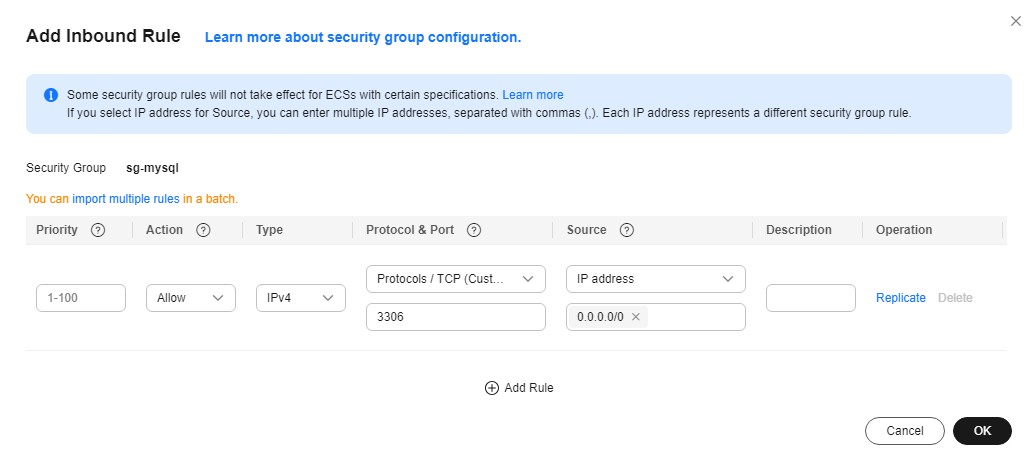
- Perform 9 to 10 to allow access from database port 22.
After the rules were configured, the figure similar to the following is displayed.

Parent topic: ECS-hosted MySQL Server
What is your overall rating for this page?
0
1
2
3
4
5
6
7
8
9
10
Very dissatisfiedVery satisfied
Thank you very much for your feedback. We will continue working to improve the documentation.
The system is busy. Please try again later.


