

Help Center/ CodeArts Build/ FAQs/ Images/ What Can I Do When the Pull of Docker Hub Images Times Out or Exceeds the Max. Attempts?
Updated on 2024-11-18 GMT+08:00
What Can I Do When the Pull of Docker Hub Images Times Out or Exceeds the Max. Attempts?
Symptoms
When the build task is executed, the following error information is displayed in a log, indicating that the image pull from Docker Hub times out or reaches the pull limit:
Error response from daemon: Get https://registry.docker-cn.com/v2/: net/http: request canceled while waiting for connection (Client.Timeout exceeded while awaiting headers)
or
toomanyrequests: You have reached your pull rate limit. You may increase the limit by authenticating and upgrading: https://www.docker.com/increase-rate-limit
Cause Analysis
The network of the Docker Hub is unstable and the frequency is limited. As a result, the image pull may time out or fail. You can migrate the Docker Hub image to SWR and then pull the image.
Solution
- Download the image of Docker Hub to the local PC.
- Upload the image to SWR. For details, see Uploading an Image Through SWR Console.
- On the Tags tab page, in the same row as the target image tag, click
 in the Image Pull Command column to copy the command.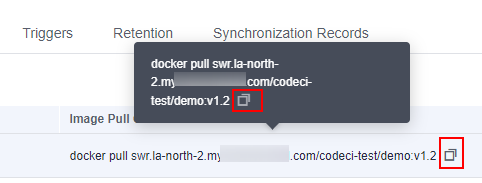
- Modify the Dockerfile in the code repository and change the image path in the file to the address copied in Step 3.

Parent topic: Images
What is your overall rating for this page?
0
1
2
3
4
5
6
7
8
9
10
Very dissatisfiedVery satisfied
Thank you very much for your feedback. We will continue working to improve the documentation.
The system is busy. Please try again later.


