

Help Center/ CodeArts Build/ FAQs/ npm Builds/ What Should I Do When the Dependency Version Cannot Be Found?
Updated on 2024-11-18 GMT+08:00
What Should I Do When the Dependency Version Cannot Be Found?
Symptoms
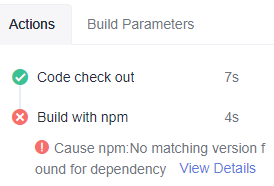
npm cannot find a matching version for the dependency. The error is displayed in the following figure.
Cause Analysis
npm cannot find a matching version for the dependency.
Solution
- Check whether the dependency versions configured in package.json and package-lock.json are correct. If not, correct them.
- Check whether the version exists in the image origin.
Parent topic: npm Builds
What is your overall rating for this page?
0
1
2
3
4
5
6
7
8
9
10
Very dissatisfiedVery satisfied
Thank you very much for your feedback. We will continue working to improve the documentation.
The system is busy. Please try again later.


