

Help Center/ GaussDB/ Developer Guide(Centralized_V2.0-3.x)/ Stored Procedure/ Basic Statements/ Assignment Statements
Updated on 2025-08-19 GMT+08:00
Assignment Statements
Variable Syntax
Figure 1 shows the syntax diagram for assigning a value to a variable.

The above syntax diagram is explained as follows:
- variable_name indicates the name of a variable.
- value can be a value or an expression. The type of value must be compatible with the type of variable_name.
Example:
1 2 3 4 5 6 7 8 9 10 11 12 13 | gaussdb=# DECLARE emp_id INTEGER := 7788; -- Assignment BEGIN emp_id := 5; -- Assignment DBE_OUTPUT.PRINT_LINE(emp_id); emp_id := 5*7784; DBE_OUTPUT.PRINT_LINE(emp_id); END; / -- The result is as follows: 5 38920 ANONYMOUS BLOCK EXECUTE |
Nested Value Assignment
Figure 2 shows the syntax diagram for assigning a nested value to a variable.
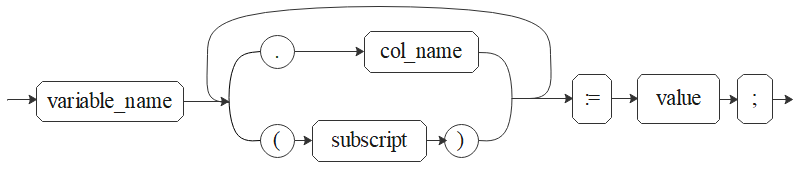
The syntax in Figure 2 is described as follows:
- variable_name: variable name
- col_name: column name
- subscript: index, which is used for an array variable. The value can be a value or an expression and must be of the int type.
- value: value or expression. The type of value must be compatible with the type of variable_name.
Example:
1 2 3 4 5 6 7 8 9 10 11 | gaussdb=# CREATE TYPE o1 AS (a int, b int); CREATE TYPE gaussdb=# DECLARE TYPE r1 is VARRAY(10) of o1; emp_id r1; BEGIN emp_id(1).a := 5;-- Assign a value. emp_id(1).b := 5*7784; END; / ANONYMOUS BLOCK EXECUTE |

In INTO mode, values can be assigned only to the columns at the first layer. Two-dimensional or above arrays are not supported.
INTO/BULK COLLECT INTO
- Values returned by statements in a stored procedure are stored in variables. BULK COLLECT INTO allows some or all returned values to be temporarily stored in an array.
- An empty result set can be returned.
Syntax
SELECT select_expressions INTO [STRICT] target FROM ...
SELECT INTO [STRICT] target expression [FROM ..]

- You can use basic SQL commands and INTO clauses to assign the result of a single row or multiple columns to a variable (such as record, row, or scalar variable list).
- The target parameter can be a record variable, a row variable, or a comma-separated list of simple variables and record/row fields.
- If behavior_compat_options is set to 'select_into_return_null' (disabled by default) and the STRICT option is specified, the query must return a non-empty result set. Otherwise, an error is reported: "NO_DATA_FOUND", "TOO_MANY_ROWS", or "QUERY_RETURNED_NO_ROWS". If the option is not specified, the empty result set can be returned.
- BULK COLLECT INTO can be used only in the A-compatible database.
Example:
gaussdb=# DROP TABLE IF EXISTS customers;
NOTICE:  table "customers" does not exist, skipping
DROP TABLE
gaussdb=# CREATE TABLE customers(id int,name varchar);
CREATE TABLE
gaussdb=# INSERT INTO customers VALUES(1,'ab');
gaussdb=# DECLARE
    my_id integer;
BEGIN
    select id into my_id from customers limit 1; -- Assign a value.
END;
/
ANONYMOUS BLOCK EXECUTE

gaussdb=# DECLARE
    type id_list is varray(6) of customers.id%type;
    id_arr id_list;
BEGIN
    select id bulk collect into id_arr from customers order by id DESC limit 20; -- Assign values in batches.
END;
/
ANONYMOUS BLOCK EXECUTE

gaussdb=# CREATE TABLE test(a integer);
CREATE TABLE
gaussdb=# insert into test values(1);
INSERT 0 1
gaussdb=# CREATE OR REPLACE FUNCTION check_test() RETURNS integer
    language plpgsql
    AS $function$
    DECLARE
     b integer;
    BEGIN
	    SELECT INTO b a FROM test WHERE a=1; -- Return an empty result set.
            RETURN b;
    END;
    $function$;
gaussdb=# SELECT check_test();
 check_test
------------
          1
(1 row)
gaussdb=# DROP TABLE customers;
DROP TABLE
gaussdb=# DROP TABLE test;
DROP TABLE
- BULK COLLECT INTO can only assign values to arrays or collections in batches. The collection type uses LIMIT properly to prevent performance deterioration caused by excessive operations on data.
- INTO and BULK COLLECT INTO support only direct nesting of record type value with fewer than four layers.
- To return an empty result set, you need to enable PostgreSQL compatibility mode during database initialization. Set set behavior_compat_options to 'select_into_return_null', the compatibility mode is enabled. If the GUC parameter set behavior_compat_options is not set, the compatibility mode is disabled.
- For array variables, elements in parentheses () are preferentially identified as index sets. Therefore, expressions with parentheses cannot be written after array variables. For example, select (1+3) into va(5) cannot be written as select into va(5) (1+3) or select into va[5] (1+3).
- INSERT INTO, UPDATE INTO, DELETE INTO and EXECUTION INTO cannot return an empty result set.
- Multiple variables are failed to be assigned values because the syntax of the subsequent variables is incorrect.
Parent topic: Basic Statements
What is your overall rating for this page?
0
1
2
3
4
5
6
7
8
9
10
Very dissatisfiedVery satisfied
Thank you very much for your feedback. We will continue working to improve the documentation.
The system is busy. Please try again later.


