

Help Center/ EventGrid/ Best Practices/ Routing OBS Application Service Messages to DMS for Kafka/ Implementation Procedure/ Buying a Kafka Instance
Updated on 2025-09-05 GMT+08:00
Buying a Kafka Instance
Buying an Instance
- Log in to the DMS for Kafka console and click Buy Kafka Instance in the upper right corner of the page.
- Configure the instance parameters. For details about the parameters for purchasing a Kafka instance, see Buying an Instance.
- Billing Mode: Select Pay-per-use.
- Region: Select the region of your EG service.
- Project: Select the default project.
- AZ: Retain the default value.
- Instance Name: Enter eg-kafka.
- Enterprise Project: Select default.
- Specifications: Retain the default value.
- Version: Select a 3.x version.
- CPU Architecture: Select x86.
- Broker Flavor: Select kafka.2u4g.cluster.small.
- Brokers: Enter 3.
- Storage Space: Select High I/O and set to 100 GB.
- Capacity Threshold Policy: Select Automatically delete.
- VPC: Select vpc-default and subnet-default.
- Security Group: Select a security group from the drop-down list.
Configure the following parameters in the Advanced Settings area.
- Kafka SASL_SSL: Enable this function.
- Security Protocol: Select SASL_SSL.
- SASL/PLAIN: Enable this function.
- Username: Enter kafka-name.
- Password: Enter a password.
- Confirm Password: Confirm new password.
- Click Buy.
Creating a Topic
- Log in to the DMS for Kafka console and select the region where the Kafka instance is located.
- On thg DMS for Kafka page, click the Kafka instance name to go to the details page.
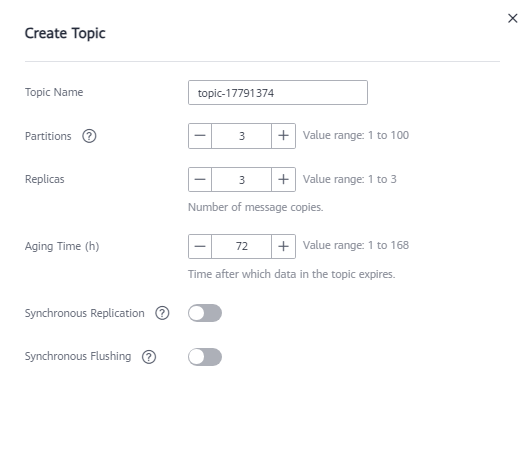
- On the Topics tab, click Create Topic.
- Configure topic parameters by referring to Figure 1. Set the topic name to topic-eg, and retain the default values for other parameters. For details about parameters for creating a topic, see Creating a Topic.
- Click OK.
Parent topic: Implementation Procedure
What is your overall rating for this page?
0
1
2
3
4
5
6
7
8
9
10
Very dissatisfiedVery satisfied
Thank you very much for your feedback. We will continue working to improve the documentation.
The system is busy. Please try again later.


