

Operation Guide
Scenario
Figure 1 shows the typical networking where a Huawei Cloud VPN gateway connects to strongSwan in static routing mode.
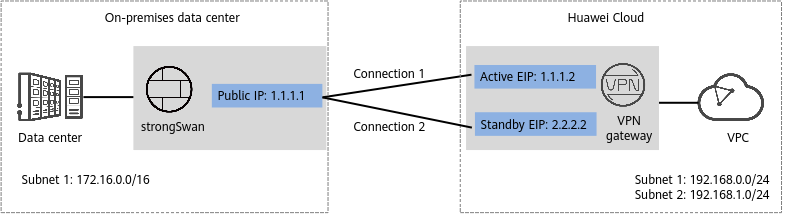
In this scenario, strongSwan has only one IP address, and the Huawei Cloud VPN gateway uses the active/standby mode. A VPN connection needs to be created between each of the active and standby EIPs of the Huawei Cloud VPN gateway and the IP address of strongSwan.
Data Plan
| Category | Item | Data |
|---|---|---|
| Huawei Cloud VPC | Subnet to be interconnected |
|
| Huawei Cloud VPN gateway | Interconnection subnet | Subnet used for communication between the VPN gateway and the VPC of the on-premises data center. Ensure that the selected interconnection subnet has four or more assignable IP addresses. 192.168.2.0/24 |
| EIP | EIPs are automatically generated when you buy them. By default, a VPN gateway uses two EIPs. In this example, the EIPs are as follows:
| |
| VPC at the strongSwan side | Subnet to be interconnected | 172.16.0.0/16 |
| VPN gateway at the strongSwan side | Public IP address | This public IP address is assigned by a carrier. In this example, the public IP address is as follows: 1.1.1.1 |
| Private IP address | In this example, the private IP address is as follows: 172.16.0.195 | |
| VPN connection | Tunnel interface addresses under Connection 1's Configuration |
|
| Tunnel interface addresses under Connection 2's Configuration |
| |
| IKE and IPsec policies | PSK | Test@123 |
| IKE policy |
| |
| IPsec policy |
|


